ArcGIS Desktop

  • Documentation
  • Support

  • My Profile
  • Aide
  • Sign Out
ArcGIS Desktop

ArcGIS Online

La plateforme cartographique de votre organisation

ArcGIS Desktop

Un SIG professionnel complet

ArcGIS Enterprise

SIG dans votre entreprise

ArcGIS for Developers

Outils de création d'applications de localisation

ArcGIS Solutions

Modèles d'applications et de cartes gratuits pour votre secteur d'activité

ArcGIS Marketplace

Téléchargez des applications et des données pour votre organisation.

  • Documentation
  • Support
Esri
  • Se connecter
user
  • Mon profil
  • Déconnexion

Help

  • Accueil
  • Commencer
  • Carte
  • Analyser
  • Gérer les données
  • Outils
  • Plus...

Viewing file properties

The properties in the General and Summary panes can be viewed using the details view in the file manager, but those from the other panes cannot. The Related Items list in the Links pane contains the product library parts to which a file is linked. The History pane provides information about different versions of a single file.

  1. Start ArcMap.
  2. If necessary, open the Product Library window by clicking Customize > Production > Product Library on the main menu.

    A tree view of the product library appears.
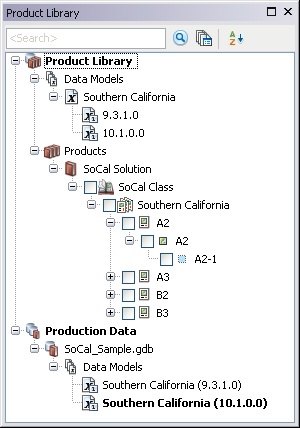
    Product Library tree view
  3. Click the Manage Files button Manage Files on the Product Library window.

    The file manager appears.
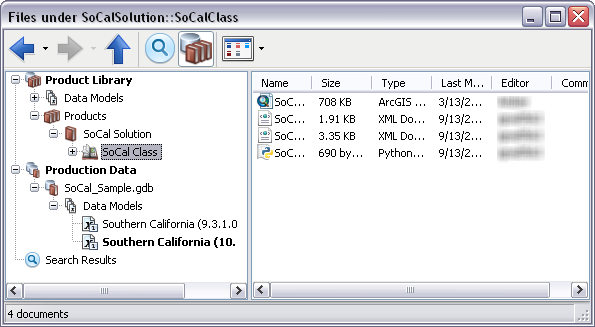
    Default view of the file manager
  4. Navigate to the file whose properties you want to view.
  5. Right-click the file and click Properties.

    The file's properties dialog box appears.

    General pane on the file Properties dialog box
    The General pane with file properties
  6. If necessary, click the name of a properties pane in the list on the left side of the properties dialog box.

    Astuce:

    Only the name and title of the file can be changed, but you can add comments.

    Learn more about the properties you can view in the General, Summary, Links, and History panes

  7. Click OK when you are finished.

ArcGIS Desktop

  • Accueil
  • Documentation
  • Support

ArcGIS Platform

  • ArcGIS Online
  • ArcGIS Desktop
  • ArcGIS Enterprise
  • ArcGIS for Developers
  • ArcGIS Solutions
  • ArcGIS Marketplace

A propos d'Esri

  • A propos de la société
  • Carrières
  • Blog des initiés
  • Conférence des utilisateurs
  • Sommet des développeurs
Esri
Donnez-nous votre avis.
Copyright © 2017 Esri. | Confidentialité | Légal