ArcGIS Desktop

  • Documentation
  • Support

  • My Profile
  • Aide
  • Sign Out
ArcGIS Desktop

ArcGIS Online

La plateforme cartographique de votre organisation

ArcGIS Desktop

Un SIG professionnel complet

ArcGIS Enterprise

SIG dans votre entreprise

ArcGIS for Developers

Outils de création d'applications de localisation

ArcGIS Solutions

Modèles d'applications et de cartes gratuits pour votre secteur d'activité

ArcGIS Marketplace

Téléchargez des applications et des données pour votre organisation.

  • Documentation
  • Support
Esri
  • Se connecter
user
  • Mon profil
  • Déconnexion

ArcMap

  • Accueil
  • Commencer
  • Carte
  • Analyser
  • Gérer les données
  • Outils
  • Extensions

Adding filtered bathymetry from the Explore Bathymetry window

To create ordered bathymetric surfaces and surface models, you need to add bathymetry datasets to the Compose Surface window. You can add datasets filtered in the Explore Bathymetry window directly to the Compose Surface window from either the Explore Bathymetry window or from the Compose Surface window.

  1. Start ArcMap.
  2. On the main menu, click Customize > Toolbars > Bathymetry.
  3. Click the Explore Bathymetry button Explore Bathymetry on the Bathymetry toolbar.

    The Explore Bathymetry window appears. The right side of the window lists all bathymetry datasets from the active BIS geodatabase.
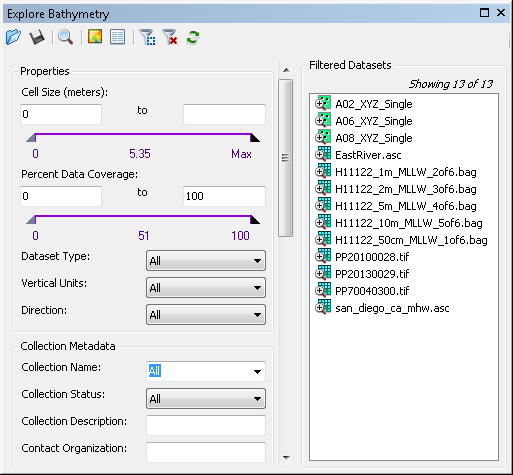
    Explore Bathymetry window
  4. Define a filter using the fields in the Properties, Collection Metadata, Extended Metadata, or Internal Metadata sections.

    The list of Bathymetry data in the Filtered Datasets list will adjust based on your query.

  5. Click the Add Filtered Datasets To Compose Surface Window button Add Filtered Datasets To Compose Surface Window at the top of the Explore Bathymetry window.

    Remarque :

    For datasets to be added to the Compose Surface window, they must share the same properties for Dataset Type, Vertical Units, and Direction.

    Astuce:

    Alternatively, if you want to add a particular dataset or a group of selected datasets from the Filtered Datasets list and not the entire list, right-click the dataset or selection and click Add to Compose Surface or Add Selected to Compose Surface.

    The Compose Surface window appears. Your filtered datasets are displayed on the right side of the window.

Rubriques connexes

  • Adding filtered bathymetry from the Compose Surface window

ArcGIS Desktop

  • Accueil
  • Documentation
  • Support

ArcGIS Platform

  • ArcGIS Online
  • ArcGIS Desktop
  • ArcGIS Enterprise
  • ArcGIS for Developers
  • ArcGIS Solutions
  • ArcGIS Marketplace

A propos d'Esri

  • A propos de la société
  • Carrières
  • Blog des initiés
  • Conférence des utilisateurs
  • Sommet des développeurs
Esri
Donnez-nous votre avis.
© Copyright 2016 Environmental Systems Research Institute, Inc. | Confidentialité | Légal