ArcGIS Desktop

  • ArcGIS Pro
  • ArcMap

  • My Profile
  • Aide
  • Sign Out
ArcGIS Desktop

ArcGIS Online

La plateforme cartographique de votre organisation

ArcGIS Desktop

Un SIG professionnel complet

ArcGIS Enterprise

SIG dans votre entreprise

ArcGIS for Developers

Outils de création d'applications de localisation

ArcGIS Solutions

Modèles d'applications et de cartes gratuits pour votre secteur d'activité

ArcGIS Marketplace

Téléchargez des applications et des données pour votre organisation.

  • Documentation
  • Support
Esri
  • Se connecter
user
  • Mon profil
  • Déconnexion

ArcMap

  • Accueil
  • Commencer
  • Carte
  • Analyser
  • Gérer les données
  • Outils
  • Extensions

Relinking a polygon grid to the Reviewer table

Disponible avec une licence Data Reviewer.

To recognize any records that have been added after the grid has been associated with the table, you must relink the grid with the table. This allows the grid to be synchronized with any new records within its extent.

For this process, the current grid needs to be unlinked from the table, then a new grid can be associated with the table.

  1. Start ArcMap.
  2. On the main menu, click Customize > Toolbars > Data Reviewer.
  3. Start a Reviewer session in one of the following:
    • A file, personal, or SQL Server Express geodatabase
    • An géodatabase d'entreprise
    • An existing Reviewer workspace
  4. Click the Reviewer Table button Reviewer Table on the Data Reviewer toolbar.
  5. Click the Reviewer Table Properties button Reviewer Table Properties on the Reviewer Table window.

    The Reviewer Table Properties dialog box appears.
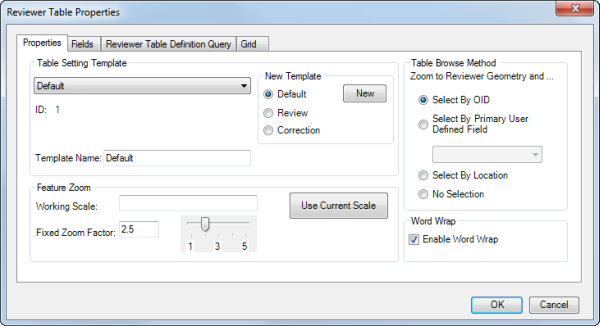
    Properties tab

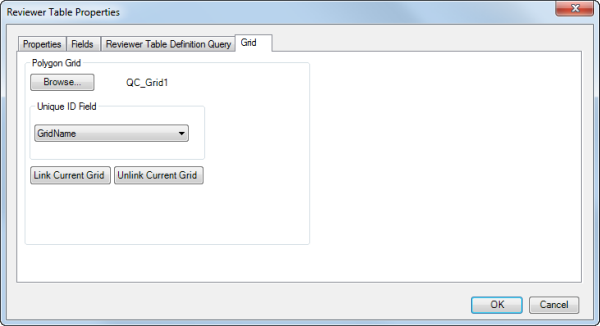
  6. Click the Grid tab.

    Grid tab

    Remarque :

    A grid cannot be linked to the Reviewer table until records are present.

  7. Click Unlink Current Grid.
  8. Cliquez sur OK.
  9. Click the Reviewer Table Properties button Reviewer Table Properties on the Reviewer Table window.

    The Reviewer Table Properties dialog box appears.

  10. Click the Grid tab.
  11. Click Browse.

    The Select Grid Feature Class dialog box appears.

  12. Navigate to the polygon grid you want to use.

    You can choose any geodatabase feature class or shapefile.

  13. Click Add.

    The Grid tab appears.

  14. Click the Unique ID Field drop-down arrow and choose a field to use when populating the QC_Grid field in the Reviewer table.
  15. Click Link Current Grid.
  16. Cliquez sur OK.

Rubriques connexes

  • What are polygon grids?
  • Adding a grid to the Reviewer Overview window from a database
  • Adding a grid to the Reviewer Overview window from the map

ArcGIS Desktop

  • Accueil
  • Documentation
  • Support

ArcGIS Platform

  • ArcGIS Online
  • ArcGIS Desktop
  • ArcGIS Enterprise
  • ArcGIS for Developers
  • ArcGIS Solutions
  • ArcGIS Marketplace

A propos d'Esri

  • A propos de la société
  • Carrières
  • Blog d’Esri
  • Conférence des utilisateurs
  • Sommet des développeurs
Esri
Donnez-nous votre avis.
Copyright © 2019 Esri. | Confidentialité | Légal