ArcGIS Desktop

  • ArcGIS Pro
  • ArcMap

  • My Profile
  • Aide
  • Sign Out
ArcGIS Desktop

ArcGIS Online

La plateforme cartographique de votre organisation

ArcGIS Desktop

Un SIG professionnel complet

ArcGIS Enterprise

SIG dans votre entreprise

ArcGIS Developers

Outils de création d'applications de localisation

ArcGIS Solutions

Modèles d'applications et de cartes gratuits pour votre secteur d'activité

ArcGIS Marketplace

Téléchargez des applications et des données pour votre organisation.

  • Documentation
  • Support
Esri
  • Se connecter
user
  • Mon profil
  • Déconnexion

ArcMap

  • Accueil
  • Commencer
  • Carte
  • Analyser
  • Gérer les données
  • Outils
  • Extensions

Applying a definition query set to your data

Disponible avec une licence Production Mapping.

Once you have created definition query sets, you can apply them to data in different charts.

  1. Start ArcMap.
  2. On the main menu, click Customize > Toolbars > Aviation Data Management.
  3. Click the Feature Display Settings button Feature Display Settings on the Aviation Data Management toolbar.

    The Feature Display Settings dialog box appears.
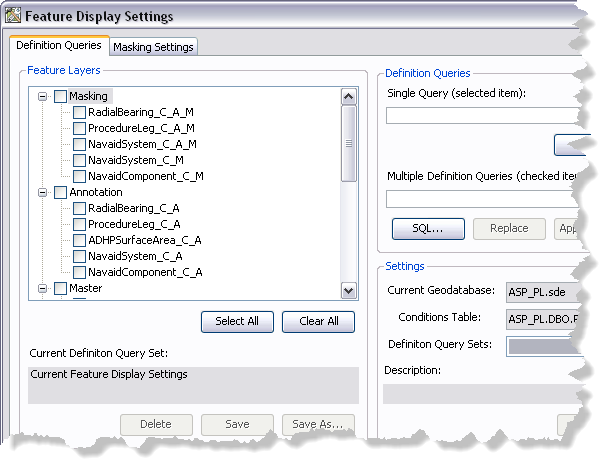
    Feature Display Settings dialog box
  4. If necessary, click the Definition Queries tab.
  5. Click the Definition Query Sets drop-down arrow and choose the definition query set you want to apply to the layers in your map.
  6. Click Load.

    Remarque :

    Once the query set has loaded, layers in the Feature Layers list change color from black to blue if their feature layer definition query will be updated.

  7. Click Apply.

    A message appears indicating that query definition conditions have been applied to feature layers in the map.
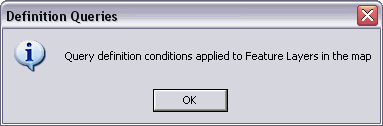
    Applying query definition message
  8. Cliquez sur OK.
  9. Click the Close button Close to close the Feature Display Settings dialog box.

    Astuce :

    When you apply a definition query, the definition query becomes part of the feature layer's properties. You must save the MXD to retain the changes made to the definition queries.

Rubriques connexes

  • Updating definition query sets

ArcGIS Desktop

  • Accueil
  • Documentation
  • Support

ArcGIS

  • ArcGIS Online
  • ArcGIS Desktop
  • ArcGIS Enterprise
  • ArcGIS
  • ArcGIS Developer
  • ArcGIS Solutions
  • ArcGIS Marketplace

A propos d'Esri

  • A propos de la société
  • Carrières
  • Blog d’Esri
  • Conférence des utilisateurs
  • Sommet des développeurs
Esri
Donnez-nous votre avis.
Copyright © 2022 Esri. | Confidentialité | Légal