ArcGIS Desktop

  • ArcGIS Pro
  • ArcMap

  • My Profile
  • Aide
  • Sign Out
ArcGIS Desktop

ArcGIS Online

La plateforme cartographique de votre organisation

ArcGIS Desktop

Un SIG professionnel complet

ArcGIS Enterprise

SIG dans votre entreprise

ArcGIS Developers

Outils de création d'applications de localisation

ArcGIS Solutions

Modèles d'applications et de cartes gratuits pour votre secteur d'activité

ArcGIS Marketplace

Téléchargez des applications et des données pour votre organisation.

  • Documentation
  • Support
Esri
  • Se connecter
user
  • Mon profil
  • Déconnexion

ArcMap

  • Accueil
  • Commencer
  • Carte
  • Analyser
  • Gérer les données
  • Outils
  • Extensions

Managing overlapping routes with route processing

The Route Processing tool can perform the following actions:

  • Hide or offset overlapping cartographic routes for a product.
  • Combine the identifiers of overlapping routes that have the same type.
  • Calculate fields on a route based on a rule condition.

This functionality allows you to simplify a product and improve its cartographic appearance.

You must configure route processing preferences settings before running the Route Processing tool.

  1. Start ArcMap.
  2. Ensure that the correct product library and production database are set.
  3. On the main menu, click Customize > Toolbars > Aviation Data Management.
  4. Click the Route Processing button Route Processing on the Aviation Data Management toolbar.

    The Route Processing dialog box appears.

  5. In the Instance(s) to Process list, expand each node in the tree view until you find the instance against which the tool will run.
  6. Check the check box next to the instance name.
  7. Click the Preference drop-down arrow and choose a preference name.
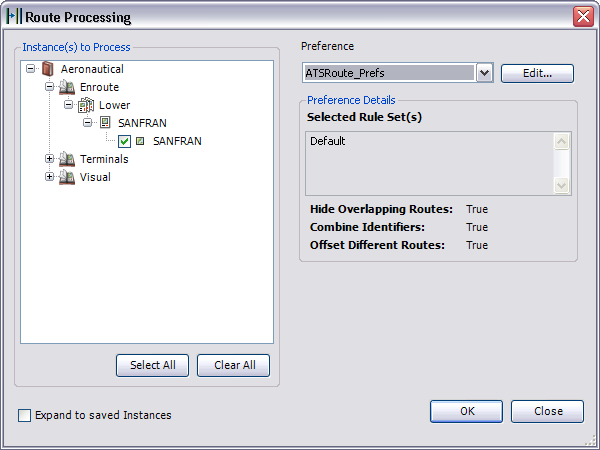
    The Route Processing dialog box

  8. To modify the route processing preference, click Edit.
  9. Click OK to run the route processing tool.

    The Route Processing Results dialog box appears.

    Remarque :

    Click View Log on the Route Processing Results dialog box to display additional information about the process.

  10. Cliquez sur Fermer.

Rubriques connexes

  • Route processing
  • Creating route processing preferences
  • Creating rule sets and rules for route processing preferences

ArcGIS Desktop

  • Accueil
  • Documentation
  • Support

ArcGIS

  • ArcGIS Online
  • ArcGIS Desktop
  • ArcGIS Enterprise
  • ArcGIS
  • ArcGIS Developer
  • ArcGIS Solutions
  • ArcGIS Marketplace

A propos d'Esri

  • A propos de la société
  • Carrières
  • Blog d’Esri
  • Conférence des utilisateurs
  • Sommet des développeurs
Esri
Donnez-nous votre avis.
Copyright © 2022 Esri. | Confidentialité | Légal