ArcGIS Desktop

  • ArcGIS Pro
  • ArcMap

  • My Profile
  • Aide
  • Sign Out
ArcGIS Desktop

ArcGIS Online

La plateforme cartographique de votre organisation

ArcGIS Desktop

Un SIG professionnel complet

ArcGIS Enterprise

SIG dans votre entreprise

ArcGIS Developers

Outils de création d'applications de localisation

ArcGIS Solutions

Modèles d'applications et de cartes gratuits pour votre secteur d'activité

ArcGIS Marketplace

Téléchargez des applications et des données pour votre organisation.

  • Documentation
  • Support
Esri
  • Se connecter
user
  • Mon profil
  • Déconnexion

ArcMap

  • Accueil
  • Commencer
  • Carte
  • Analyser
  • Gérer les données
  • Outils
  • Extensions

Replacing a definition query for a single layer

Disponible avec une licence Production Mapping.

You can replace a definition query for a single layer. This allows ArcMap to limit features displayed for a specific chart.

  1. Start ArcMap.
  2. On the main menu, click Customize > Toolbars > Aviation Data Management.
  3. Click the Feature Display Settings button Feature Display Settings on the Aviation Data Management toolbar.

    The Feature Display Settings dialog box appears.
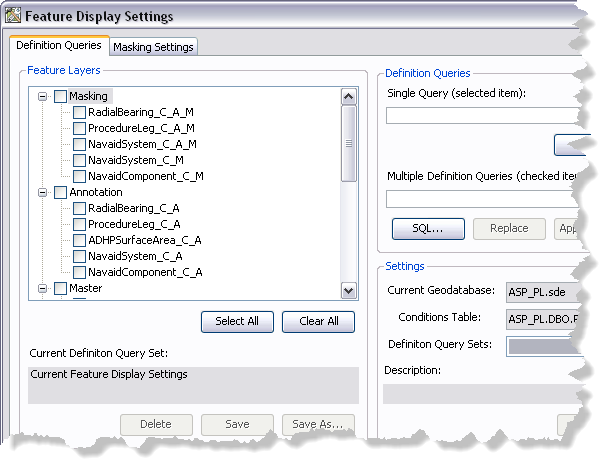
    Feature Display Settings dialog box
  4. If necessary, click the Definition Queries tab.
  5. In the Feature Layers list, click the name of the feature layer for which you want to define the definition query.

    Remarque :

    Checking the check box next to the feature layer will not select it.

  6. Click SQL.

    The Define Query Expression dialog box appears.

  7. Modify the query as needed.
  8. Click Verify.

    The Verifying Expression message box appears and indicates whether or not the expression is valid.

  9. Click OK to close the message box.
  10. Click OK.

    The Definition Queries tab appears with the modified query in the Single query (selected item) text box.

  11. In the Feature Layers list, check the check box next to the feature layer whose definition query you want to update.
  12. Click Apply.

    A message appears indicating which feature layer definition query has been updated.

  13. Cliquez sur OK.
  14. Click the Close button Close to close the Feature Display Settings dialog box.

Rubriques connexes

  • Updating definition query sets

ArcGIS Desktop

  • Accueil
  • Documentation
  • Support

ArcGIS

  • ArcGIS Online
  • ArcGIS Desktop
  • ArcGIS Enterprise
  • ArcGIS
  • ArcGIS Developer
  • ArcGIS Solutions
  • ArcGIS Marketplace

A propos d'Esri

  • A propos de la société
  • Carrières
  • Blog d’Esri
  • Conférence des utilisateurs
  • Sommet des développeurs
Esri
Donnez-nous votre avis.
Copyright © 2022 Esri. | Confidentialité | Légal