ArcGIS Desktop

  • ArcGIS Pro
  • ArcMap

  • My Profile
  • Aide
  • Sign Out
ArcGIS Desktop

ArcGIS Online

La plateforme cartographique de votre organisation

ArcGIS Desktop

Un SIG professionnel complet

ArcGIS Enterprise

SIG dans votre entreprise

ArcGIS Developers

Outils de création d'applications de localisation

ArcGIS Solutions

Modèles d'applications et de cartes gratuits pour votre secteur d'activité

ArcGIS Marketplace

Téléchargez des applications et des données pour votre organisation.

  • Documentation
  • Support
Esri
  • Se connecter
user
  • Mon profil
  • Déconnexion

ArcMap

  • Accueil
  • Commencer
  • Carte
  • Analyser
  • Gérer les données
  • Outils
  • Extensions

Defining filter properties

Disponible avec une licence Production Mapping.

Once you have defined a filter or filters, you can also modify or redefine the filter configurations you defined previously (that is, in the Filter by attributes properties, Filter By Location, or other filtering dialog boxes).

  1. Verify that you are in layout view if necessary.
  2. Right-click the graphic table element and click Properties.

    The Table Properties dialog box appears.

  3. If necessary, click the Data Source tab.

    The Data Source tab appears.
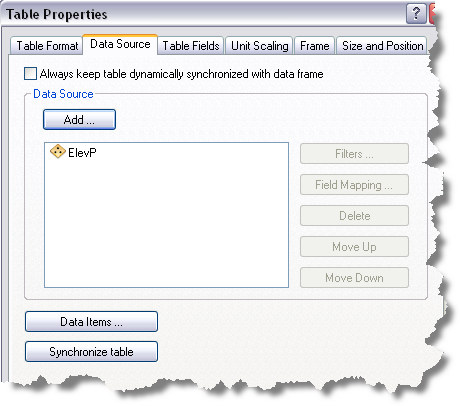
    Data Source tab
  4. Click the data source you want to use in the Data Source list on the Data Source tab.

    The chosen data source is highlighted, and the Filters button becomes available.

  5. Click Filters.

    The Data Filters dialog box appears.
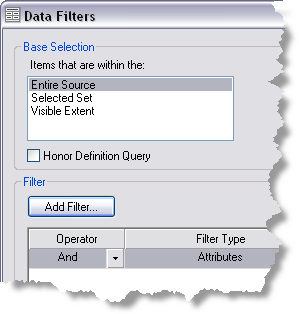
    Data Filters dialog box with filters
  6. Right-click a row in the Filter area and click Properties.

    A dialog box appears, depending on the filter type you have selected.

  7. Modify or redefine the filter configurations you want to change.
  8. Click OK.

Rubriques connexes

  • Filtering the data source using attributes
  • Filtering the data source by location
  • Filtering table fields for sorting
  • Filtering table fields to show unique values
  • Filtering table fields to limit the maximum number of items returned

ArcGIS Desktop

  • Accueil
  • Documentation
  • Support

ArcGIS

  • ArcGIS Online
  • ArcGIS Desktop
  • ArcGIS Enterprise
  • ArcGIS
  • ArcGIS Developer
  • ArcGIS Solutions
  • ArcGIS Marketplace

A propos d'Esri

  • A propos de la société
  • Carrières
  • Blog d’Esri
  • Conférence des utilisateurs
  • Sommet des développeurs
Esri
Donnez-nous votre avis.
Copyright © 2021 Esri. | Confidentialité | Légal