ArcGIS Desktop

  • ArcGIS Pro
  • ArcMap

  • My Profile
  • Aide
  • Sign Out
ArcGIS Desktop

ArcGIS Online

La plateforme cartographique de votre organisation

ArcGIS Desktop

Un SIG professionnel complet

ArcGIS Enterprise

SIG dans votre entreprise

ArcGIS Developers

Outils de création d'applications de localisation

ArcGIS Solutions

Modèles d'applications et de cartes gratuits pour votre secteur d'activité

ArcGIS Marketplace

Téléchargez des applications et des données pour votre organisation.

  • Documentation
  • Support
Esri
  • Se connecter
user
  • Mon profil
  • Déconnexion

ArcMap

  • Accueil
  • Commencer
  • Carte
  • Analyser
  • Gérer les données
  • Outils
  • Extensions

Workflow configuration for the Sync Product Files custom step

Disponible avec une licence Production Mapping.

The Sync Product Files step copies files from job attachments to the product or vice versa. A series of parameters is available to define which files need to be synchronized on the job or on the product.
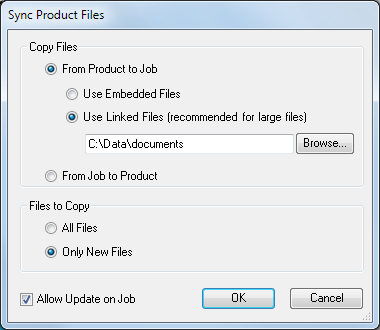
Sync Product Files dialog box

The table below outlines each step-type argument and associated behavior:

NameDescriptionArgument exampleBehavior

Copy Files

Specifies the direction in which the files will be synchronized.

Three options are available:

  • From Product to Job—Use Embedded Files (Default)
  • From Product to Job—Use Linked Files
  • From Job to Product

/SyncDirection:FromProductToJob

Copies files from the product to the job attachments.

/SyncLocation:"<location>"

Saves the files in the specified location; the files are then linked to the job.

/SyncDirection: FromJobToProduct

Copies files from job attachments to the product.

Files to Copy

Specifies which files will be synchronized.

Two options are available:

  • All Files (Default)
  • Only New Files

/SyncOption: AllFiles

Copies all files even if they exist at the target location.

/SyncOption: OnlyNewFiles

Copies only the files that don’t exist at the target location.

Allow Update on Job (Optional)

Determines whether the job may be updated on step execution.

Two options are available:

  • Allow Update (Default)
  • Do Not Allow Update

/Allow Update: True

On step execution, the Sync Product Files dialog box appears, and you can choose to update the direction of synchronization and which files to synchronize.

/Allow Update: False

On step execution, the Sync Product Files dialog box appears, but you cannot update this property.

Arguments for the Sync Product Files step
Remarque :

When configuring the step execution, if the supported platform is set to Both or Server, all error messages are suppressed. By default the setting is Both. Only the Desktop option allows you to see the error messages at execution.

For details, see Configuring the custom object step execution.

ArcGIS Desktop

  • Accueil
  • Documentation
  • Support

ArcGIS

  • ArcGIS Online
  • ArcGIS Desktop
  • ArcGIS Enterprise
  • ArcGIS
  • ArcGIS Developer
  • ArcGIS Solutions
  • ArcGIS Marketplace

A propos d'Esri

  • A propos de la société
  • Carrières
  • Blog d’Esri
  • Conférence des utilisateurs
  • Sommet des développeurs
Esri
Donnez-nous votre avis.
Copyright © 2021 Esri. | Confidentialité | Légal