ArcGIS Desktop

  • ArcGIS Pro
  • ArcMap

  • My Profile
  • Aide
  • Sign Out
ArcGIS Desktop

ArcGIS Online

La plateforme cartographique de votre organisation

ArcGIS Desktop

Un SIG professionnel complet

ArcGIS Enterprise

SIG dans votre entreprise

ArcGIS Developers

Outils de création d'applications de localisation

ArcGIS Solutions

Modèles d'applications et de cartes gratuits pour votre secteur d'activité

ArcGIS Marketplace

Téléchargez des applications et des données pour votre organisation.

  • Documentation
  • Support
Esri
  • Se connecter
user
  • Mon profil
  • Déconnexion

ArcMap

  • Accueil
  • Commencer
  • Carte
  • Analyser
  • Gérer les données
  • Outils
  • Extensions

Displaying check boxes alongside workflow nodes in the Task Assistant workflow

In the Configuration Manager, you can configure Task Assistant Manager so check boxes appear next to each step in a workflow. The check boxes show the step status as each one is executed in the workflow and help users track their progress.

A workflow with check boxes next to each step
  1. Click Start > Task Assistant Manager > Configuration Manager.

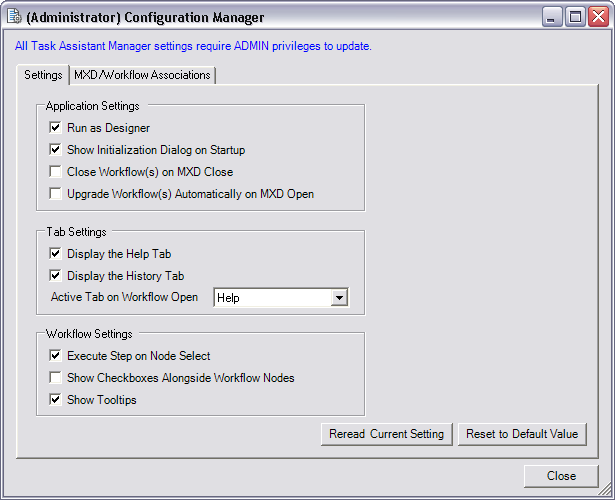
    The (Administrator) Configuration Manager dialog box appears.

    Remarque :

    If you do not have administrator privileges on the machine, the dialog box title is Configuration Manager, and you cannot change to Task Assistant designer mode.

  2. Click the Settings tab.
    Configuration Manager dialog box
  3. Check the Show Checkboxes Alongside Workflow Nodes check box to enable the check boxes next to workflow nodes.
  4. Click Reread Current Settings to undo any changes and return the Configuration Manager to the current settings.
  5. Click Reset to Default Values to reset the default settings.
  6. Cliquez sur Fermer.
  7. Remarque :

    The check boxes can still be hidden within the Task Assistant ArcMap environment using the Hide Checkboxes command on the context menu; however, the setting is refreshed from the configuration value for every new ArcMap session.

ArcGIS Desktop

  • Accueil
  • Documentation
  • Support

ArcGIS

  • ArcGIS Online
  • ArcGIS Desktop
  • ArcGIS Enterprise
  • ArcGIS
  • ArcGIS Developer
  • ArcGIS Solutions
  • ArcGIS Marketplace

A propos d'Esri

  • A propos de la société
  • Carrières
  • Blog d’Esri
  • Conférence des utilisateurs
  • Sommet des développeurs
Esri
Donnez-nous votre avis.
Copyright © 2021 Esri. | Confidentialité | Légal