ArcGIS Desktop

  • ArcGIS Pro
  • ArcMap

  • My Profile
  • Aide
  • Sign Out
ArcGIS Desktop

ArcGIS Online

La plateforme cartographique de votre organisation

ArcGIS Desktop

Un SIG professionnel complet

ArcGIS Enterprise

SIG dans votre entreprise

ArcGIS Developers

Outils de création d'applications de localisation

ArcGIS Solutions

Modèles d'applications et de cartes gratuits pour votre secteur d'activité

ArcGIS Marketplace

Téléchargez des applications et des données pour votre organisation.

  • Documentation
  • Support
Esri
  • Se connecter
user
  • Mon profil
  • Déconnexion

ArcMap

  • Accueil
  • Commencer
  • Carte
  • Analyser
  • Gérer les données
  • Outils
  • Extensions

Exporting custom styles

Custom styles can be exported to share between Task Assistant Manager designers. This can be useful when several custom styles have been created for tools.

The custom styles can be exported using the Style Manager.

  1. Open the Style Manager dialog box by doing one of the following:
    • Click the Start button, then click Task Assistant Manager > Style Manager.
    • Start ArcMap, click the Task Assistant button Task Assistant on the Task Manager toolbar, right-click in the Task Assistant window, and click Style Manager.
  2. Click Export Styles on the Style Manager dialog box.

    The Export Custom Styles dialog box appears.
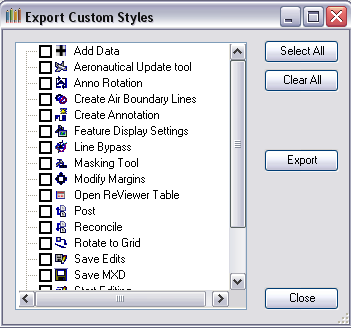
    Export Custom Styles dialog box

  3. Check the check box next to each custom style to export.
  4. Click Export.

    Remarque :

    Only custom styles can be exported. You can export the styles to any location except for the default style folder (a subfolder of the installation directory).

    The Export Custom Styles dialog box appears.

    Export Custom Styles dialog box

  5. Choose a style to overwrite or type a new name in the File name text box.
  6. Click Save.
  7. Click Close to close the Export Custom Styles dialog box.
  8. Click Close to close the Style Manager dialog box.
  9. Remarque :

    It is recommended that you export your custom styles to a location that is not a subfolder of the installation directory on a regular basis. This saved backup style file can be used to reimport custom styles and avoid the need to manually re-create custom styles that have been deleted.

ArcGIS Desktop

  • Accueil
  • Documentation
  • Support

ArcGIS

  • ArcGIS Online
  • ArcGIS Desktop
  • ArcGIS Enterprise
  • ArcGIS
  • ArcGIS Developer
  • ArcGIS Solutions
  • ArcGIS Marketplace

A propos d'Esri

  • A propos de la société
  • Carrières
  • Blog d’Esri
  • Conférence des utilisateurs
  • Sommet des développeurs
Esri
Donnez-nous votre avis.
Copyright © 2021 Esri. | Confidentialité | Légal