ArcGIS Desktop

  • ArcGIS Pro
  • ArcMap

  • My Profile
  • Aide
  • Sign Out
ArcGIS Desktop

ArcGIS Online

La plateforme cartographique de votre organisation

ArcGIS Desktop

Un SIG professionnel complet

ArcGIS Enterprise

SIG dans votre entreprise

ArcGIS Developers

Outils de création d'applications de localisation

ArcGIS Solutions

Modèles d'applications et de cartes gratuits pour votre secteur d'activité

ArcGIS Marketplace

Téléchargez des applications et des données pour votre organisation.

  • Documentation
  • Support
Esri
  • Se connecter
user
  • Mon profil
  • Déconnexion

Mapping and Charting Solutions install guide

Installing Mapping and Charting Solutions on your computer

Disponible avec une licence Production Mapping.

The installation wizard allows you to a choose the products you want to install. Before starting the installation wizard, verify that your computer meets the minimum system requirements, and close all applications on your computer.
  1. The Mapping and Charting Solutions Desktop download offers the option to start the installation after the files have been extracted. Choose this method, or, to manually launch the setup program, use the setup.exe file.
  2. During the installation, read the master agreement and accept it, or exit if you do not agree with the terms.
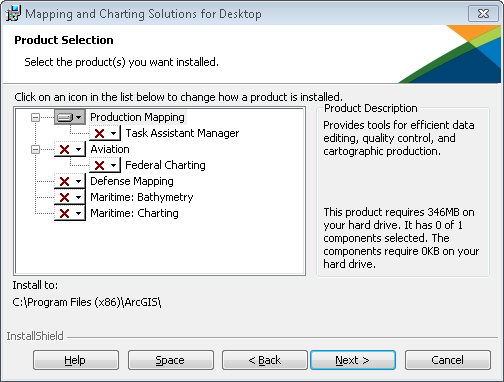
  3. The Product Selection dialog box allows you to choose the products you want to install.
    Product Selection dialog box
    Remarque :

    Production Mapping will be installed by default.

    Astuce :

    The Aviation option installs ArcGIS Aviation Charting and ArcGIS Aviation Airports functionality and, optionally, Federal Charting functionality.

When the setup is complete, the products installed will be available from ArcGIS Desktop.

Licence :

Even though all the products can be installed, the tools are not enabled unless a license for the product is available in your license manager.

Rubriques connexes

  • Installing Mapping and Charting Solutions silently
  • Managing installation features
  • Uninstalling Mapping and Charting Solutions

ArcGIS Desktop

  • Accueil
  • Documentation
  • Support

ArcGIS

  • ArcGIS Online
  • ArcGIS Desktop
  • ArcGIS Enterprise
  • ArcGIS
  • ArcGIS Developer
  • ArcGIS Solutions
  • ArcGIS Marketplace

A propos d'Esri

  • A propos de la société
  • Carrières
  • Blog d’Esri
  • Conférence des utilisateurs
  • Sommet des développeurs
Esri
Donnez-nous votre avis.
Copyright © 2021 Esri. | Confidentialité | Légal