Data Reviewer のライセンスで利用可能。
The Reviewer table has several fields that provide information about each record. This includes the life cycle phase of a record, its status, the source, check title, check notes, and review, correction, and verification status information. The fields have names that are displayed by default, but you can customize them to make them more meaningful to people in your organization. For example, suppose you want to make the label for the REVIEWSTATUS field easier to understand. You could change it to something like Description or Review Description.
Once the field labels are changed, the new names are applied to all the sessions in the Reviewer workspace.
- Start ArcMap.
- On the main menu, click Customize > Toolbars > Data Reviewer.
- Start a Reviewer session in one of the following:
-
Click the Reviewer Table button
 on the Data Reviewer toolbar.
- Click the Reviewer Table Properties button
 on the Reviewer Table window.
The Reviewer Table Properties dialog box appears.
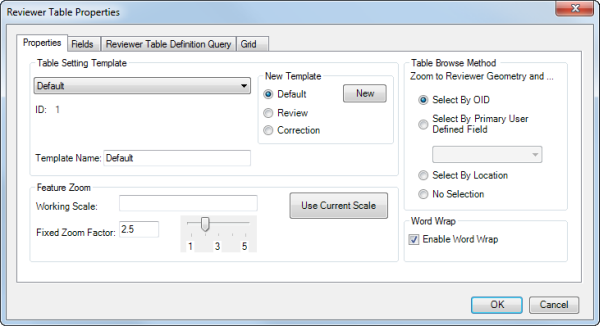
- Click the Fields tab.
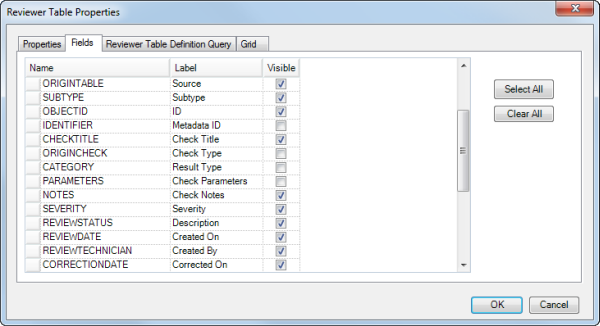
- Click the Label cell next to the field name you want to change.
- Type a new name for the field in the Label cell.
- Click another cell in the table to apply the change.
- Repeat steps 7 through 9 for the field labels you want to change.
- Click OK when you are finished.