Data Reviewer のライセンスで利用可能。
The table setting templates can be used to apply specific table views when a technician is reviewing, correcting, or verifying data. In this case, the template is the combination of all the Reviewer table properties, which are saved in the Reviewer database so they can be used later. The templates can be used to apply definition queries, column visibility options, and a polygon grid to a Reviewer table when a person is assigned a particular quality control task, such as correction or verification.
- Start ArcMap.
- On the main menu, click Customize > Toolbars > Data Reviewer.
- Start a Reviewer session in one of the following:
-
Click the Reviewer Table button
 on the Data Reviewer toolbar.
- Click the Reviewer Table Properties button
 on the Reviewer Table window.
The Reviewer Table Properties dialog box appears.
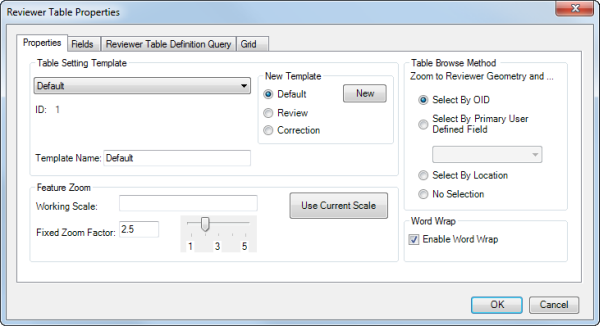
- Click the Table Setting Template drop-down arrow and choose a template.
- [OK] をクリックします。