ArcGIS Desktop

  • ArcGIS Pro
  • ArcMap

  • My Profile
  • ヘルプ
  • Sign Out
ArcGIS Desktop

ArcGIS Online

組織のマッピング プラットフォーム

ArcGIS Desktop

完全なプロ仕様の GIS

ArcGIS Enterprise

エンタープライズ GIS

ArcGIS Developers

位置情報利用アプリの開発ツール

ArcGIS Solutions

各種業界向けの無料のテンプレート マップおよびテンプレート アプリケーション

ArcGIS Marketplace

組織で使えるアプリとデータを取得

  • ドキュメント
  • サポート
Esri
  • サイン イン
user
  • マイ プロフィール
  • サイン アウト

ArcMap

  • Home
  • Get Started
  • Map
  • Analyze
  • Manage Data
  • Tools
  • Extensions

LRS upgrades

  • Upgrading an LRS from a Roads and Highways database

Esri Roads and Highways provides the functionality to upgrade an linear referencing system (LRS) created in an earlier release of Esri Roads and Highways.

Upgrading an LRS from a Roads and Highways database

An LRS created using an earlier release of Esri Roads and Highways must be upgraded.

To upgrade the LRS, right-click it in ArcCatalog or the Catalog window in ArcMap and click Upgrade ALRS.
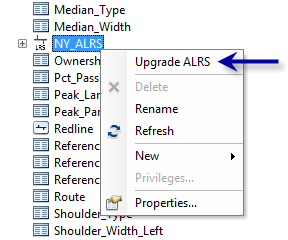
Upgrade ALRS Context menu
注意:

If your LRS was created or last updated in a version prior to Roads and Highways 10.2.2 Patch 1, you will be prompted whether you want to use conflict prevention. If you want to enable conflict prevention, follow the steps in Enabling conflict prevention in the LRS.

ArcGIS Desktop

  • ホーム
  • ドキュメント
  • サポート

ArcGIS

  • ArcGIS Online
  • ArcGIS Desktop
  • ArcGIS Enterprise
  • ArcGIS Developers
  • ArcGIS Solutions
  • ArcGIS Marketplace

Esri について

  • 会社概要
  • 採用情報
  • Esri ブログ
  • ユーザ カンファレンス
  • デベロッパ サミット
Esri
ご意見・ご感想をお寄せください。
Copyright © 2021 Esri. | プライバシー | リーガル