ArcGIS Desktop

  • ArcGIS Pro
  • ArcMap

  • My Profile
  • ヘルプ
  • Sign Out
ArcGIS Desktop

ArcGIS Online

組織のマッピング プラットフォーム

ArcGIS Desktop

完全なプロ仕様の GIS

ArcGIS Enterprise

エンタープライズ GIS

ArcGIS Developers

位置情報利用アプリの開発ツール

ArcGIS Solutions

各種業界向けの無料のテンプレート マップおよびテンプレート アプリケーション

ArcGIS Marketplace

組織で使えるアプリとデータを取得

  • ドキュメント
  • サポート
Esri
  • サイン イン
user
  • マイ プロフィール
  • サイン アウト

ArcMap

  • ホーム
  • はじめに
  • マップ
  • 解析
  • データ管理
  • ツール
  • エクステンション

Creating the Holding Pattern Entry Diagram

The Holding Pattern Entry Diagram (HPED) tool creates holding pattern entry diagrams for designated holding pattern features in the current procedure.

  1. Start ArcMap.
  2. Ensure that the data model version is set to the AIS Charting model under the Production Database node in the Product Library window.
  3. If AIS Charting has been set as the data model version, it appears in boldface on the Product Library window under Production Database. If it is not, right-click the AIS Charting data model and click Set As Active.
  4. Ensure that your chart's data frame is set to the appropriate instance by right-clicking the data frame, selecting Properties, and clicking the Product Library tab.
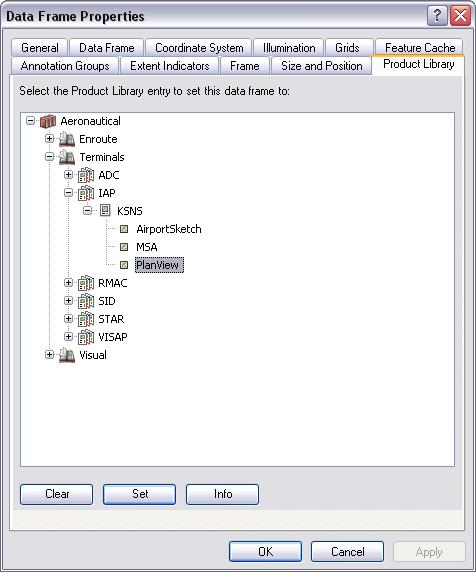
    Data Frame Properties dialog box

  5. Click OK.

    メモ:

    The creation of an HPED is based on the data in the production database and the instance designated on the Data Frame Properties dialog box. To designate a holding pattern feature for HPED creation, change the HPEntry_Code field on the holding pattern ProcedureLeg_C feature to Yes. The HPED tool will create an entry diagram for that procedure leg.

  6. On the main menu, click View > Layout View.
  7. On the main menu, click Customize > Toolbars > Aviation Terminal Procedure.
  8. Click the Holding Pattern Entry Diagram button Holding Pattern Entry Diagram on the Aviation Terminal Procedures toolbar.

    ヒント:

    If information on the procedure where the HPED resides changes, and that information affects the HPED, you can regenerate it by clicking the Holding Pattern Entry Diagram button again.

ArcGIS Desktop

  • ホーム
  • ドキュメント
  • サポート

ArcGIS

  • ArcGIS Online
  • ArcGIS Desktop
  • ArcGIS Enterprise
  • ArcGIS
  • ArcGIS Developer
  • ArcGIS Solutions
  • ArcGIS Marketplace

Esri について

  • 会社概要
  • 採用情報
  • Esri ブログ
  • ユーザ カンファレンス
  • デベロッパ サミット
Esri
ご意見・ご感想をお寄せください。
Copyright © 2022 Esri. | プライバシー | リーガル