ArcGIS Desktop

  • ArcGIS Pro
  • ArcMap

  • My Profile
  • ヘルプ
  • Sign Out
ArcGIS Desktop

ArcGIS Online

組織のマッピング プラットフォーム

ArcGIS Desktop

完全なプロ仕様の GIS

ArcGIS Enterprise

エンタープライズ GIS

ArcGIS Developers

位置情報利用アプリの開発ツール

ArcGIS Solutions

各種業界向けの無料のテンプレート マップおよびテンプレート アプリケーション

ArcGIS Marketplace

組織で使えるアプリとデータを取得

  • ドキュメント
  • サポート
Esri
  • サイン イン
user
  • マイ プロフィール
  • サイン アウト

ArcMap

  • ホーム
  • はじめに
  • マップ
  • 解析
  • データ管理
  • ツール
  • エクステンション

Resetting the product instance for a map document data frame

Production Mapping ライセンスで利用できます。

If the map document data frame is associated with a product instance and needs to be associated with another instance, you can reset it by clearing the previous instance and choosing another one.

  1. Start ArcMap.
  2. In the current map document, right-click a data frame and click Data Frame Properties.

    The Data Frame Properties dialog box appears.

  3. Click the Product Library tab.
  4. Navigate to the instance associated with the data frame.
  5. Click Clear.

    ヒント:

    You can click OK if you only want to clear the product instance and don't want to associate another one.

  6. Navigate to the product instance with which you want to associate the data frame.
  7. Click Set.

    The name of the selected instance appears dimmed.
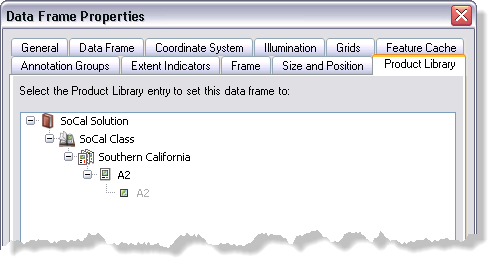
    Example of an instance associated to the data frame
  8. Click OK.

ArcGIS Desktop

  • ホーム
  • ドキュメント
  • サポート

ArcGIS

  • ArcGIS Online
  • ArcGIS Desktop
  • ArcGIS Enterprise
  • ArcGIS
  • ArcGIS Developer
  • ArcGIS Solutions
  • ArcGIS Marketplace

Esri について

  • 会社概要
  • 採用情報
  • Esri ブログ
  • ユーザ カンファレンス
  • デベロッパ サミット
Esri
ご意見・ご感想をお寄せください。
Copyright © 2021 Esri. | プライバシー | リーガル