Production Mapping ライセンスで利用できます。
The Check Out step checks out the product associated with the job. A series of parameters is available to define how the checkout location is specified.
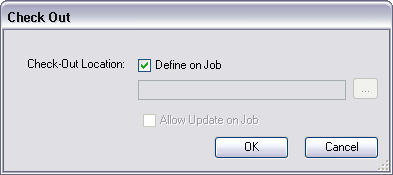
The table below outlines each step type argument and associated behavior:
| Name | Description | Argument example | Behavior |
|---|---|---|---|
Check Out Location (Optional) | Specifies the checkout location. Two options are available:
| Define on Job is the default; no argument specified. | On step execution, you are prompted to browse to a checkout location. |
/CheckOutLocation:C:\Data | The checkout location preset on the step type is displayed. The Update Check Out Location argument determines whether you can update this default checkout location. | ||
Update Check Out Location (Optional—Only available when default checkout location is set) | Determines whether the default checkout location may be updated on step execution. Two options are available:
| Allow Update is the default; no argument specified. | On step execution, you are presented with the checkout location preset on the step type. You can choose to update this location. |
/UpdateCheckOutLocation:False | On step execution, you are presented with the checkout location preset on the step type but cannot update this property. |