Production Mapping ライセンスで利用できます。
When using the Product Library custom steps as part of a workflow, some specific settings on the Launch ArcMap step are required to configure the step behavior to do the following:
- Open the map document that has been checked out of the product library.
- Save the map document to the checkout location. This is necessary so that the map document can then be checked back in to the product library.
The Product Library tokens are used as part of this configuration. On the Launch ArcMap step, the following parameters are required and should be input as follows:
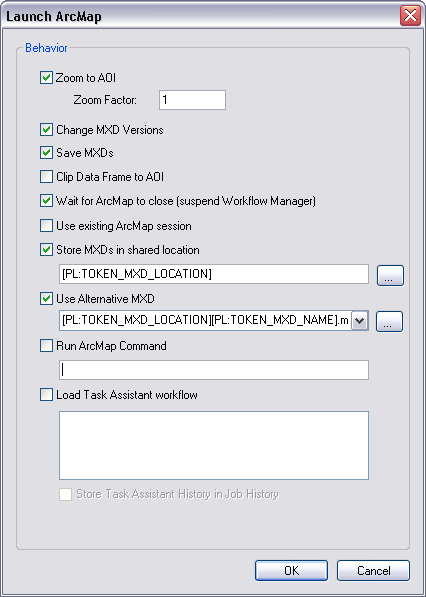
The table below describes each token in the Launch ArcMap step.
| Name | Description | Argument example | Behavior |
|---|---|---|---|
Use Alternate MXD | Specifies an alternate MXD to be used as the map template for the job | /mxd:[PL:TOKEN_MXD_LOCATION][PL:TOKEN_MXD_NAME].mxd | On step execution, Workflow Manager (Classic) opens a copy of the map document checked out from the product library. |
Store MXDs in Shared Location | Specifies a location where the job MXD should be saved | /mxdfolder:[PL:TOKEN_MXD_LOCATION] | Workflow Manager (Classic) saves the map document back to the same location where it was checked out from the product library. |
See Working with custom steps for general information about configuring the Launch ArcMap custom step.
The final requirement to enable this workflow is to set the job type MXD naming scheme to use the [PL:TOKEN_MXD_NAME] token. This ensures that when Workflow Manager (Classic) names the map document, the name matches the product map document name.
