ArcGIS Desktop

  • ArcGIS Pro
  • ArcMap

  • My Profile
  • Справка
  • Sign Out
ArcGIS Desktop

ArcGIS Online

Картографическая платформа вашей организации

ArcGIS Desktop

Полноценная профессиональная ГИС

ArcGIS Enterprise

ГИС предприятия

ArcGIS for Developers

Инструменты для встраивания приложений с местоположениями

ArcGIS Solutions

Бесплатные шаблоны карт и приложений для отрасли

ArcGIS Marketplace

Получение приложения и данных для вашей организации.

  • Документация
  • Поддержка
Esri
  • Войти
user
  • Мой профиль
  • Выход

ArcMap

  • Home
  • Get Started
  • Map
  • Analyze
  • Manage Data
  • Tools
  • Extensions

Applying a definition query set to your data

Доступно с лицензией Production Mapping.

Once you have created definition query sets, you can apply them to data in different charts.

  1. Запустите ArcMap.
  2. On the main menu, click Customize > Toolbars > Aviation Data Management.
  3. Click the Feature Display Settings button Feature Display Settings on the Aviation Data Management toolbar.

    The Feature Display Settings dialog box appears.
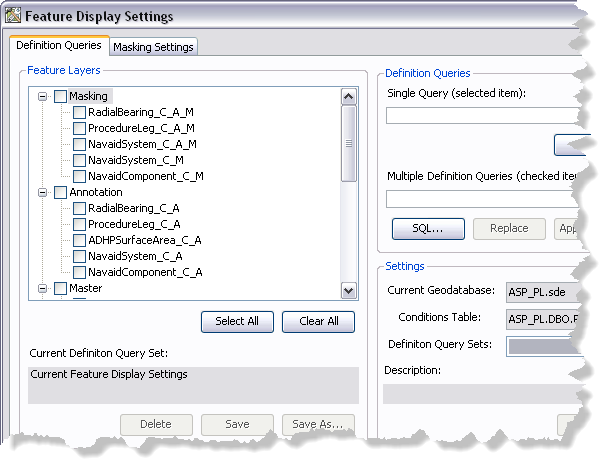
    Feature Display Settings dialog box
  4. If necessary, click the Definition Queries tab.
  5. Click the Definition Query Sets drop-down arrow and choose the definition query set you want to apply to the layers in your map.
  6. Click Load.

    Примечание:

    Once the query set has loaded, layers in the Feature Layers list change color from black to blue if their feature layer definition query will be updated.

  7. Click Apply.

    A message appears indicating that query definition conditions have been applied to feature layers in the map.
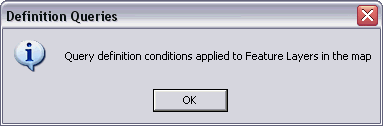
    Applying query definition message
  8. Нажмите ОК.
  9. Click the Close button Close to close the Feature Display Settings dialog box.

    Подсказка:

    When you apply a definition query, the definition query becomes part of the feature layer's properties. You must save the MXD to retain the changes made to the definition queries.

Связанные разделы

  • Updating definition query sets

ArcGIS Desktop

  • На главную
  • Документация
  • Поддержка

ArcGIS Platform

  • ArcGIS Online
  • ArcGIS Desktop
  • ArcGIS Enterprise
  • ArcGIS for Developers
  • ArcGIS Solutions
  • ArcGIS Marketplace

Об Esri

  • О нас
  • Карьера
  • Блог Esri
  • Конференция пользователей
  • Саммит разработчиков
Esri
Расскажите нам, что вы думаете.
Copyright © 2020 Esri. | Конфиденциальность | Правовая информация