ArcGIS Desktop

  • Документация
  • Поддержка

  • My Profile
  • Справка
  • Sign Out
ArcGIS Desktop

ArcGIS Online

Картографическая платформа вашей организации

ArcGIS Desktop

Полноценная профессиональная ГИС

ArcGIS Enterprise

ГИС предприятия

ArcGIS for Developers

Инструменты для встраивания приложений с местоположениями

ArcGIS Solutions

Бесплатные шаблоны карт и приложений для отрасли

ArcGIS Marketplace

Получение приложения и данных для вашей организации.

  • Документация
  • Поддержка
Esri
  • Войти
user
  • Мой профиль
  • Выход

ArcMap

  • На главную
  • Начало работы
  • Карта
  • Анализ
  • Управление данными
  • Инструменты
  • Дополнительные модули

Grouping the solution metadata fields

You can group the column headings of the solution metadata or sort the column values in ascending or descending order to help you find what you are looking for.

Подсказка:

The Advanced View command is disabled by default, and you will need to enable it to use it.

  1. Start ArcMap.
  2. If necessary, open the Product Library window by clicking Customize > Production > Product Library on the main menu.

    A tree view of the product library appears.
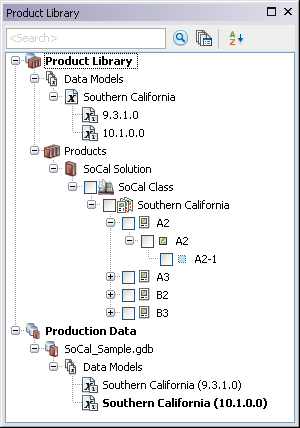
    Product Library tree view
  3. If necessary, expand Product Library and Products.
  4. If necessary, enable the Advanced View command.
  5. Right-click the solution for which you want to view metadata and click Advanced View.

    The Advanced View window appears.

    Advanced View window
    Подсказка:

    You can sort the column values in ascending or descending order.

  6. Click the name of the column heading and drag it to the area where it says to drag a column header to group by that column.

    Example of dragging a heading

  7. If necessary, click the plus sign (+) to expand the first entry and drag another column heading.
  8. Repeat step 5 as necessary.

    The rows in the window are sorted based on the values for the columns you have chosen.

    Example of grouping column headings
    Подсказка:

    You can ungroup the fields by dragging the column heading down with the other fields.

ArcGIS Desktop

  • На главную
  • Документация
  • Поддержка

ArcGIS Platform

  • ArcGIS Online
  • ArcGIS Desktop
  • ArcGIS Enterprise
  • ArcGIS for Developers
  • ArcGIS Solutions
  • ArcGIS Marketplace

Об Esri

  • О нас
  • Карьера
  • Блог сотрудников
  • Конференция пользователей
  • Саммит разработчиков
Esri
Расскажите нам, что вы думаете.
© Copyright 2016 Environmental Systems Research Institute, Inc. | Конфиденциальность | Правовая информация