ArcGIS Desktop

  • Документация
  • Поддержка

  • My Profile
  • Справка
  • Sign Out
ArcGIS Desktop

ArcGIS Online

Картографическая платформа вашей организации

ArcGIS Desktop

Полноценная профессиональная ГИС

ArcGIS Enterprise

ГИС предприятия

ArcGIS for Developers

Инструменты для встраивания приложений с местоположениями

ArcGIS Solutions

Бесплатные шаблоны карт и приложений для отрасли

ArcGIS Marketplace

Получение приложения и данных для вашей организации.

  • Документация
  • Поддержка
Esri
  • Войти
user
  • Мой профиль
  • Выход

ArcMap

  • На главную
  • Начало работы
  • Карта
  • Анализ
  • Управление данными
  • Инструменты
  • Дополнительные модули

Renaming map documents associated with products

The map documents that are associated with various levels of the product library can be renamed as necessary so they are more meaningful to you and other users of the product library.

One example would be creating a new field configuration table that uses the Vector Map Level 1 data model. The product created would be called NewProduct, and the .mxd for the product would be named NewProduct.mxd. To make the name more intuitive, you could change the alias of the product and the name of the .mxd so it matches the data model associated with the product.

You can rename the .mxd file in the product properties as shown below or through the product library file manager.

  1. Start ArcMap.
  2. If necessary, open the Product Library window by clicking Customize > Production > Product Library on the main menu.

    A tree view of the product library appears.
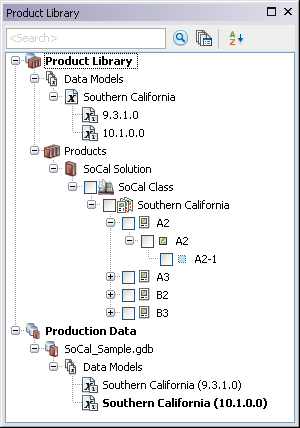
    Product Library tree view
  3. If necessary, expand Product Library and Products.
  4. Navigate to the product whose .mxd file you want to rename.
  5. Right-click the product and click Properties.

    The Product Properties dialog box appears.

  6. Click the plus sign next to MxD to view the properties.
    MxD properties on the Product Properties dialog box
  7. Click the cell next to File.
  8. Double-click the existing text and type a new name for the .mxd file in the text box.

    This name needs to be formatted as <map document name>.mxd.

  9. Нажмите ОК.

ArcGIS Desktop

  • На главную
  • Документация
  • Поддержка

ArcGIS Platform

  • ArcGIS Online
  • ArcGIS Desktop
  • ArcGIS Enterprise
  • ArcGIS for Developers
  • ArcGIS Solutions
  • ArcGIS Marketplace

Об Esri

  • О нас
  • Карьера
  • Блог сотрудников
  • Конференция пользователей
  • Саммит разработчиков
Esri
Расскажите нам, что вы думаете.
© Copyright 2016 Environmental Systems Research Institute, Inc. | Конфиденциальность | Правовая информация