ArcGIS Desktop

  • ArcGIS Pro
  • ArcMap

  • My Profile
  • Справка
  • Sign Out
ArcGIS Desktop

ArcGIS Online

Картографическая платформа вашей организации

ArcGIS Desktop

Полноценная профессиональная ГИС

ArcGIS Enterprise

ГИС предприятия

ArcGIS Developers

Инструменты для встраивания приложений с местоположениями

ArcGIS Solutions

Бесплатные шаблоны карт и приложений для отрасли

ArcGIS Marketplace

Получение приложения и данных для вашей организации.

  • Документация
  • Поддержка
Esri
  • Войти
user
  • Мой профиль
  • Выход

ArcMap

  • На главную
  • Начало работы
  • Карта
  • Анализ
  • Управление данными
  • Инструменты
  • Дополнительные модули

Adding the mercator scale bar

The mercator scale bar is a customized scale bar displayed on aeronautical charts using a mercator projection.
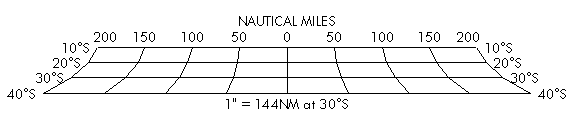
Mercator Scale Bar
  1. Запустите ArcMap.
  2. On the main menu, click View > Layout View.
  3. On the main menu, click Customize > Toolbars > Aviation Layout.
  4. Click the Mercator Scale Bar button Mercator Scale Bar on the Aviation Layout toolbar.

    By default, the mercator scale bar represents the current focus map scale if it is not zero.

    Примечание:

    The mercator scale bar is not dynamically linked to the data frame properties; scale changes do not automatically update the mercator scale bar element.

ArcGIS Desktop

  • На главную
  • Документация
  • Поддержка

ArcGIS

  • ArcGIS Online
  • ArcGIS Desktop
  • ArcGIS Enterprise
  • ArcGIS
  • ArcGIS Developer
  • ArcGIS Solutions
  • ArcGIS Marketplace

Об Esri

  • О нас
  • Карьера
  • Блог Esri
  • Конференция пользователей
  • Саммит разработчиков
Esri
Расскажите нам, что вы думаете.
Copyright © 2022 Esri. | Конфиденциальность | Правовая информация