ArcGIS Desktop

  • ArcGIS Pro
  • ArcMap

  • My Profile
  • Справка
  • Sign Out
ArcGIS Desktop

ArcGIS Online

Картографическая платформа вашей организации

ArcGIS Desktop

Полноценная профессиональная ГИС

ArcGIS Enterprise

ГИС предприятия

ArcGIS Developers

Инструменты для встраивания приложений с местоположениями

ArcGIS Solutions

Бесплатные шаблоны карт и приложений для отрасли

ArcGIS Marketplace

Получение приложения и данных для вашей организации.

  • Документация
  • Поддержка
Esri
  • Войти
user
  • Мой профиль
  • Выход

ArcMap

  • На главную
  • Начало работы
  • Карта
  • Анализ
  • Управление данными
  • Инструменты
  • Дополнительные модули

Creating chart leads for selected features

The Chart Leads tool creates chart leads for selected features intersecting the data frame. Before the tool is run, the chart leads properties must be configured.

  1. Запустите ArcMap.
  2. Ensure that the production properties are set correctly.

    Properties include the product library workspace, production database workspace, Data Model Version, and Instances Maintained. The Data Model Version must be set to an AIS-based data model.

  3. Configure the chart leads properties if you have not done so already.
  4. Ensure that your chart's data frame is set to the appropriate instance by right-clicking the data frame, clicking Properties, then clicking the Product Library tab.
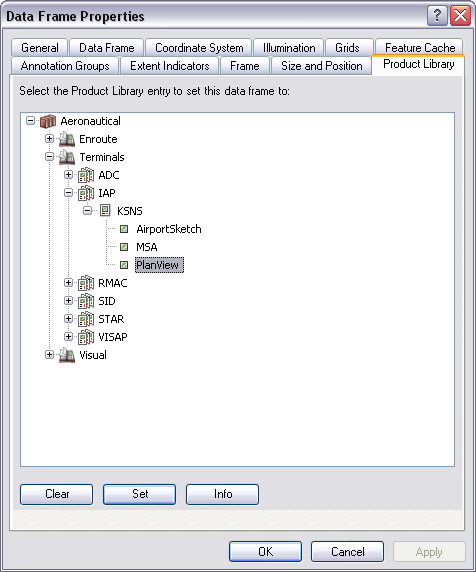
    Data Frame Properties dialog box
    Примечание:

    The data frame's coordinate system must match the product AOI extent's coordinate system in the product library.

  5. Select the line features for which to create chart leads.

    Подсказка:

    Modify the selectable layers if necessary.

  6. On the main menu, click View > Layout View.
  7. On the main menu, click Customize > Toolbars > Aviation Layout.
  8. Click the Chart Leads button Chart Leads on the Aviation Layout toolbar.

Chart leads are created for the selected line features.

ArcGIS Desktop

  • На главную
  • Документация
  • Поддержка

ArcGIS

  • ArcGIS Online
  • ArcGIS Desktop
  • ArcGIS Enterprise
  • ArcGIS
  • ArcGIS Developer
  • ArcGIS Solutions
  • ArcGIS Marketplace

Об Esri

  • О нас
  • Карьера
  • Блог Esri
  • Конференция пользователей
  • Саммит разработчиков
Esri
Расскажите нам, что вы думаете.
Copyright © 2022 Esri. | Конфиденциальность | Правовая информация