ArcGIS Desktop

  • ArcGIS Pro
  • ArcMap

  • My Profile
  • Справка
  • Sign Out
ArcGIS Desktop

ArcGIS Online

Картографическая платформа вашей организации

ArcGIS Desktop

Полноценная профессиональная ГИС

ArcGIS Enterprise

ГИС предприятия

ArcGIS Developers

Инструменты для встраивания приложений с местоположениями

ArcGIS Solutions

Бесплатные шаблоны карт и приложений для отрасли

ArcGIS Marketplace

Получение приложения и данных для вашей организации.

  • Документация
  • Поддержка
Esri
  • Войти
user
  • Мой профиль
  • Выход

ArcMap

  • На главную
  • Начало работы
  • Карта
  • Анализ
  • Управление данными
  • Инструменты
  • Дополнительные модули

Replacing a definition query for a single layer

Доступно с лицензией Production Mapping.

You can replace a definition query for a single layer. This allows ArcMap to limit features displayed for a specific chart.

  1. Запустите ArcMap.
  2. On the main menu, click Customize > Toolbars > Aviation Data Management.
  3. Click the Feature Display Settings button Feature Display Settings on the Aviation Data Management toolbar.

    The Feature Display Settings dialog box appears.
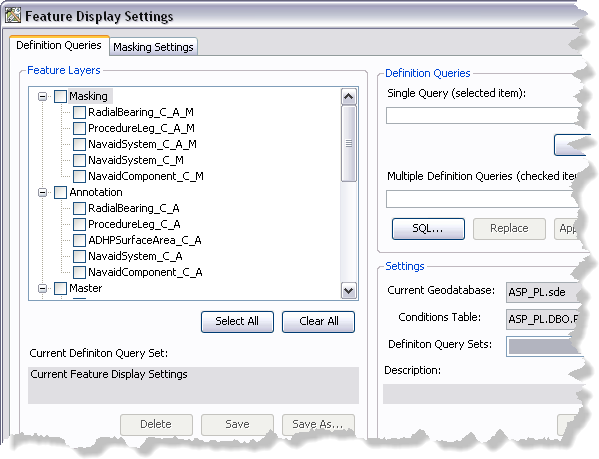
    Feature Display Settings dialog box
  4. If necessary, click the Definition Queries tab.
  5. In the Feature Layers list, click the name of the feature layer for which you want to define the definition query.

    Примечание:

    Checking the check box next to the feature layer will not select it.

  6. Click SQL.

    The Define Query Expression dialog box appears.

  7. Modify the query as needed.
  8. Click Verify.

    The Verifying Expression message box appears and indicates whether or not the expression is valid.

  9. Click OK to close the message box.
  10. Click OK.

    The Definition Queries tab appears with the modified query in the Single query (selected item) text box.

  11. In the Feature Layers list, check the check box next to the feature layer whose definition query you want to update.
  12. Click Apply.

    A message appears indicating which feature layer definition query has been updated.

  13. Нажмите ОК.
  14. Click the Close button Close to close the Feature Display Settings dialog box.

Связанные разделы

  • Updating definition query sets

ArcGIS Desktop

  • На главную
  • Документация
  • Поддержка

ArcGIS

  • ArcGIS Online
  • ArcGIS Desktop
  • ArcGIS Enterprise
  • ArcGIS
  • ArcGIS Developer
  • ArcGIS Solutions
  • ArcGIS Marketplace

Об Esri

  • О нас
  • Карьера
  • Блог Esri
  • Конференция пользователей
  • Саммит разработчиков
Esri
Расскажите нам, что вы думаете.
Copyright © 2022 Esri. | Конфиденциальность | Правовая информация