ArcGIS Desktop

  • ArcGIS Pro
  • ArcMap

  • My Profile
  • Справка
  • Sign Out
ArcGIS Desktop

ArcGIS Online

Картографическая платформа вашей организации

ArcGIS Desktop

Полноценная профессиональная ГИС

ArcGIS Enterprise

ГИС предприятия

ArcGIS Developers

Инструменты для встраивания приложений с местоположениями

ArcGIS Solutions

Бесплатные шаблоны карт и приложений для отрасли

ArcGIS Marketplace

Получение приложения и данных для вашей организации.

  • Документация
  • Поддержка
Esri
  • Войти
user
  • Мой профиль
  • Выход

ArcMap

  • На главную
  • Начало работы
  • Карта
  • Анализ
  • Управление данными
  • Инструменты
  • Дополнительные модули

Viewing cartographic exception statistics

The Cartographic Exceptions Statistics tool displays a summary of the cartographic exceptions stored in the selected aviation production database. The summary is categorized by instance, feature class, and exception type.

  1. Запустите ArcMap.
  2. Ensure that the correct product library and production database are set.
  3. Ensure that your chart's data frame is set to the appropriate instance by right-clicking the data frame, clicking Properties, and clicking the Product Library tab.
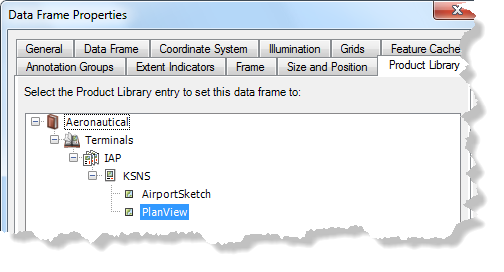
    Data Frame Properties dialog box

  4. On the main menu, click Customize > Toolbars > Aviation Data Management.
  5. Click the Cartographic Exceptions Statistics button Cartographic Exceptions Statistics on the Aviation Data Management toolbar.

    The Cartographic Exception Statistics dialog box appears.
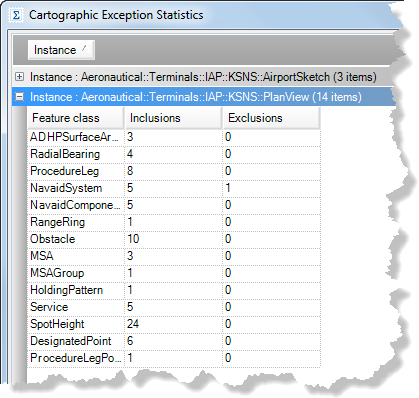
    Cartographic Exception Statistics dialog box

  6. Click an option to display statistics:
    • Show All—Displays all statistics for each data frame on the chart.
    • Show Errors—Only displays errors for each data frame on the chart. This can occur if the main feature has been moved or deleted.
  7. To view the statistics report as a text file that can be saved, click View Log.
  8. Click Close to close the window.

ArcGIS Desktop

  • На главную
  • Документация
  • Поддержка

ArcGIS

  • ArcGIS Online
  • ArcGIS Desktop
  • ArcGIS Enterprise
  • ArcGIS
  • ArcGIS Developer
  • ArcGIS Solutions
  • ArcGIS Marketplace

Об Esri

  • О нас
  • Карьера
  • Блог Esri
  • Конференция пользователей
  • Саммит разработчиков
Esri
Расскажите нам, что вы думаете.
Copyright © 2022 Esri. | Конфиденциальность | Правовая информация