Nautical charts often contain information associated with the chart, but the information cannot be captured as separate features (for example, margin notes, warnings, and cautions). This information is known as chart notes. Chart notes are linked to the Dqyarea feature class. You can associate these notes with other features as related attributes.
Note tables
DNC geodatabases contain 12 note tables. Each table represents a thematic layer as defined in specification MIL-PRF-89023, page 5. Each thematic layer represents a Vector Product Format (VPF) grouping of feature classes.
| Thematic layer name | Note table name |
|---|---|
Cultural Landmarks | culnotestable |
Earth Cover | ecrnotestable |
Environment | envnotestable |
Hydrography | hydnotestable |
Inland Waterways | iwynotestable |
Land Cover | lcrnotestable |
Limits | limnotestable |
Aids to Navigation | navnotestable |
Obstructions | obsnotestable |
Port Facilities | pornotestable |
Relief | relnotestable |
Data Quality | dqynotestable |
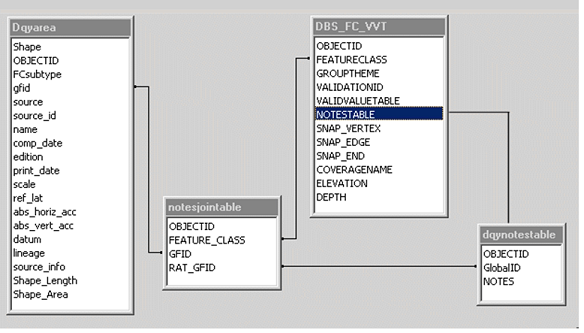
Another DNC geodatabase table named DBS_FC_VVT lists which thematic layer a DNC feature class belongs to. This table also identifies the note table that contains a feature class's notes.
Note tables store note information in binary large object (BLOB) fields. You can view and edit note information with the Notes Editor dialog box.
The link between features and notes
Each note table stores notes specific to a thematic layer. Features link to notes through a join table in the DNC geodatabase. The join table allows a note to pertain to many different features and a feature to have many different notes, as long as they belong to the same thematic layer. The feature class's gfid field relates to the join table's GFID field. The join table's RAT_GFID field relates to the thematic layer notes table's GlobalID field.
Notes Editor
You can use the Notes Editor tool to view, add, delete, or modify notes associated with individual features. Adding, deleting, or modifying notes requires that you start editing. You can view notes outside an edit session. Notes displayed in read-only mode originate from the workspace of the layers in the Table Of Contents window.