ArcGIS Desktop

  • ArcGIS Pro
  • ArcMap

  • My Profile
  • Справка
  • Sign Out
ArcGIS Desktop

ArcGIS Online

Картографическая платформа вашей организации

ArcGIS Desktop

Полноценная профессиональная ГИС

ArcGIS Enterprise

ГИС предприятия

ArcGIS Developers

Инструменты для встраивания приложений с местоположениями

ArcGIS Solutions

Бесплатные шаблоны карт и приложений для отрасли

ArcGIS Marketplace

Получение приложения и данных для вашей организации.

  • Документация
  • Поддержка
Esri
  • Войти
user
  • Мой профиль
  • Выход

ArcMap

  • На главную
  • Начало работы
  • Карта
  • Анализ
  • Управление данными
  • Инструменты
  • Дополнительные модули

Advanced SQL Calculator

Доступно с лицензией Production Mapping.

  • SQL expressions
  • Interacting with query results

The Advanced SQL Calculator tool allows you to query features across an entire database, or multiple databases, using a Structured Query Language (SQL) expression, and presents the results in a tabular format. The table displays the results of the query based on the fields selected in the Advanced SQL Calculator query builder dialog box. If you are in an edit session, you can also individually modify records or calculate values for multiple records with common fields across multiple tables in a single database.

Примечание:

All query results returned by the Advanced SQL Calculator tool are cleared when the Advanced SQL Calculator Results dialog box is closed.

SQL expressions

SQL expressions are built according to a standard syntax. For more information, see Building a query expression.

With the query builder for the Advanced SQL Calculator tool, you can also control what is displayed in the results table aside from your expression results. You can choose to display additional fields for the layers being used in your expression. Additionally, you can constrain the query to the current extent.

Interacting with query results

In the Advanced SQL Calculator Results dialog box, you can interact with both the table records and the features with which they are associated. You can select and zoom to features and calculate field values if you are in an edit session.
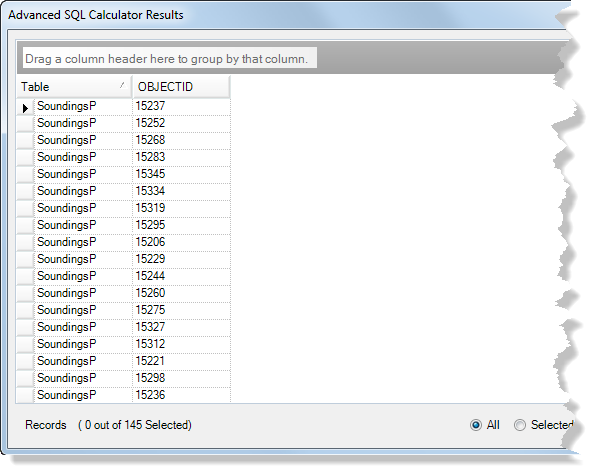
Advanced SQL Calculator Results dialog box

Связанные разделы

  • Building a query with the Advanced SQL Calculator
  • Calculating field values in batch

ArcGIS Desktop

  • На главную
  • Документация
  • Поддержка

ArcGIS

  • ArcGIS Online
  • ArcGIS Desktop
  • ArcGIS Enterprise
  • ArcGIS
  • ArcGIS Developer
  • ArcGIS Solutions
  • ArcGIS Marketplace

Об Esri

  • О нас
  • Карьера
  • Блог Esri
  • Конференция пользователей
  • Саммит разработчиков
Esri
Расскажите нам, что вы думаете.
Copyright © 2021 Esri. | Конфиденциальность | Правовая информация