ArcGIS Desktop

  • ArcGIS Pro
  • ArcMap

  • My Profile
  • Справка
  • Sign Out
ArcGIS Desktop

ArcGIS Online

Картографическая платформа вашей организации

ArcGIS Desktop

Полноценная профессиональная ГИС

ArcGIS Enterprise

ГИС предприятия

ArcGIS Developers

Инструменты для встраивания приложений с местоположениями

ArcGIS Solutions

Бесплатные шаблоны карт и приложений для отрасли

ArcGIS Marketplace

Получение приложения и данных для вашей организации.

  • Документация
  • Поддержка
Esri
  • Войти
user
  • Мой профиль
  • Выход

ArcMap

  • На главную
  • Начало работы
  • Карта
  • Анализ
  • Управление данными
  • Инструменты
  • Дополнительные модули

Resetting the product instance for a map document data frame

Доступно с лицензией Production Mapping.

If the map document data frame is associated with a product instance and needs to be associated with another instance, you can reset it by clearing the previous instance and choosing another one.

  1. Запустите ArcMap.
  2. In the current map document, right-click a data frame and click Data Frame Properties.

    The Data Frame Properties dialog box appears.

  3. Click the Product Library tab.
  4. Navigate to the instance associated with the data frame.
  5. Click Clear.

    Подсказка:

    You can click OK if you only want to clear the product instance and don't want to associate another one.

  6. Navigate to the product instance with which you want to associate the data frame.
  7. Click Set.

    The name of the selected instance appears dimmed.
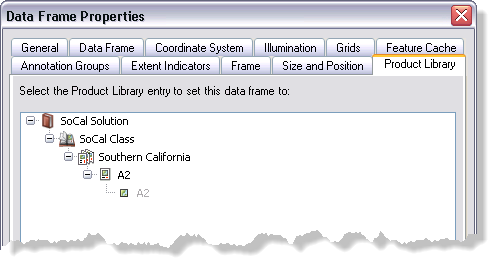
    Example of an instance associated to the data frame
  8. Click OK.

ArcGIS Desktop

  • На главную
  • Документация
  • Поддержка

ArcGIS

  • ArcGIS Online
  • ArcGIS Desktop
  • ArcGIS Enterprise
  • ArcGIS
  • ArcGIS Developer
  • ArcGIS Solutions
  • ArcGIS Marketplace

Об Esri

  • О нас
  • Карьера
  • Блог Esri
  • Конференция пользователей
  • Саммит разработчиков
Esri
Расскажите нам, что вы думаете.
Copyright © 2021 Esri. | Конфиденциальность | Правовая информация