ArcGIS for Maritime:Bathymetry is a component of the ArcGIS for Maritime platform and is available with ArcGIS for Desktop. As an extension, it builds upon the existing functionality of mosaic datasets to allow for:
- Managing bathymetric data from a central geodatabase
- Storing and querying gridded and vector bathymetric datasets and creating custom surfaces from them
- Creating and managing collections of bathymetric datasets
- Managing custom metadata associated with any dataset formats as well as internal metadata for Bathymetric Attributed Grids (BAGs) from the Open Navigation Surface project for collections of datasets
- Extracting depth values from bathymetric surfaces
Interface
ArcMap is the main application interface for working with the Bathymetry Solution. Within ArcMap, you can manage, visualize, and extract bathymetry data using interactive windows and the geoprocessing framework. Geoprocessing tools are also available within ArcCatalog and the Catalog window in ArcMap.
Bathymetry Solution includes the Bathymetry toolbar and several geoprocessing tools for working with bathymetry data.
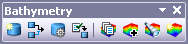
Bathymetry toolbar
The primary tools that you will use to access data with the Bathymetry Solution are accessible from the Bathymetry toolbar. The toolbar includes some administrative-level tools that typical users will not likely need, as well as tools for regular users:
- Administrator-level users typically create and manage BIS databases. The Bathymetry toolbar includes tools for creating a Bathymetric Information System (BIS) geodatabase from an existing, empty enterprise or file geodatabase. It also includes functionality for managing connections to existing BIS geodatabases, for changing BIS settings, and for diagnosing any issues with or optimizing an active BIS. While a database administrator might typically perform these tasks, the tools are available to all BIS users.
- Regular users will use the tools on the right half of the Bathymetry toolbar. These include tools for managing collections of datasets, adding bathymetry data to the BIS, filtering bathymetric datasets, and sorting bathymetric data to create custom surfaces.
Windows in the ArcMap interface
You will work with bathymetry data and metadata from two windows within ArcMap: the Explore Bathymetry and the Compose Surface windows. The Explore Bathymetry window allows you to filter bathymetric datasets, and the Compose Surface window allows you to order datasets and combine them according to specified rules and export surfaces.
Geoprocessing tools
The Bathymetry Solution contains geoprocessing tools and a model that are accessible from the Bathymetry toolbox. The geoprocessing toolbox includes tools for exporting depth points from a gridded surface and converting a point feature class to an ASCII file, for thinning the density of a point feature class on the basis of depth, and for automating the process of loading bathymetry datasets into a BIS. The toolbox also includes a model to directly output sampled depth
points from a gridded surface to an ASCII file. 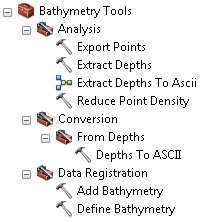
Integration with the Nautical Information System (NIS)
The Bathymetry toolbox includes the Extract Depths tool that links BIS data with the Nautical Information System (NIS), the ArcGIS for Maritime:Charting central geodatabase for managing all product features. The Extract Depths tool extracts depth points from a surface and stores them in a point feature class. These extracted points can then be imported into the NIS or charting data models.