摘要
Exports point features from a point surface model created within the Compose Surface window in ArcGIS for Maritime:Bathymetry.
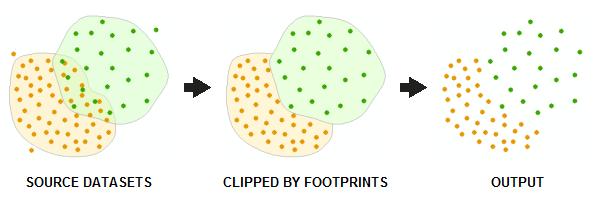
Exported point features are copied directly from source point datasets associated with representative rasters referenced in the surface model and are not extracted from cell values of the rasters themselves. Footprint polygons specified when point datasets are added to a BIS are used to determine the areas in which points should be exported from each source point dataset. In areas of overlap between two or more datasets in the surface model, points from only the topmost dataset (based on ordering rules defined in the surface model) are exported.
用法
The BIS Model parameter is the name of a point surface model contained within the BIS workspace. You create and save BIS models in the Compose Surface window in Bathymetry Solution.
The Output Features parameter is the location in which the new output feature class will be generated.
语法
ExportPoints_bathymetry (bis_workspace, bis_model, out_features)
| 参数 | 说明 | 数据类型 |
bis_workspace | The Bathymetric Information System (BIS) geodatabase (.gdb) or a connection (.sde) to the BIS database containing the point surface model. | Workspace |
bis_model | The name of the composite surface in the BIS Workspace. | String |
out_features | The feature class that will contain the extracted features. This tool will output a new, z-enabled point feature class. | Feature Class |
代码实例
Export Points example (stand-alone script)
The following stand-alone script demonstrates how to use the ExportPoints tool.
# Name: ExportPoints_Example.py
# Description: Extracts point features from a BIS composite surface.
# Requirements: ArcGIS for Maritime Bathymetry

# setup parameters
bis_workspace = "C:/data/BIS.gdb"
bis_model = "NewModel"
out_features = "C:/output/Output.gdb/PointFC"

# for a stand-alone script, check out the extension first
arcpy.CheckOutExtension("Bathymetry")

# execute the tool.
arcpy.ExportPoints_bathymetry(bis_workspace, bis_model, out_features)
环境
许可信息
- ArcGIS for Desktop Basic: 否
- ArcGIS for Desktop Standard: 需要 Maritime Bathymetry
- ArcGIS for Desktop Advanced: 需要 Maritime Bathymetry