The advanced callout/multiple text element functionality receives and interprets all the required information from an XML script. For example, you can display the text in the top text element differently than the bottom text element by specifying different attributes for each parameter within each unique identification tag. This XML script is ingested into a visual specification rule for each type of annotation that needs to be created. Once the rule is calculated, the appropriate field of the cartographic feature class is populated, and annotation can be created.
XML script examples for custom annotation
These XML examples show how the parameters can be used.
The first example is hypothetical and is meant for coders/scripters/developers to have an idea of how to use the script. The second example is a complex script that calculates the cartographic feature class to create the Navaid annotation feature class based on the calculated field. The third example is formatted to allow annotation to be abbreviated.
Example 1: Simple
Function Generate([OBJECTID], [MiddleAnno], [TopAnno], [BottomAnno], [LeftAnno], [RightAnno], [MorseCode])
Generate = "<MultipleTextElement>" & TextBackground & TextElement([OBJECTID], [MiddleAnno], [TopAnno], [BottomAnno], [LeftAnno], [RightAnno], [MorseCode]) & "</MultipleTextElement>"
End Function

Function TextBackground()
TextBackground = "<TextBackground Units = 'Points'>" & Background & Callout & Shadow & Margins & Placement & "</TextBackground>"
End Function

Function Background()
Background = "<Background Roundness='15'><Symbol><Outline Width='0.2'><CLR Red='255' Green='255' Blue ='255'></CLR></Outline></Symbol></Background>"
End Function

Function Callout()
Callout = "<Callout Tolerance='10.0' Snap='True' Truncated='0'><Symbol><Outline Width='0.2'><CLR Red='13' Green='23' Blue ='110'></CLR></Outline><Fill><CLR Red='255' Green='255' Blue ='255'></CLR></Fill><Arrowhead Size='0'><CLR Red='0' Green='0' Blue ='0'></CLR></Arrowhead></Symbol></Callout>"
End Function

Function Shadow()
Shadow = "<Shadow HorizontalOffset ='0' VerticalOffset ='0'><Symbol><Outline Width='0.2'><CLR Red='13' Green='23' Blue ='110'></CLR></Outline><Fill><CLR Red='255' Green='255' Blue ='255'></CLR></Fill></Symbol></Shadow>"
End Function

Function Margins()
Margins = "<Margins Top='2.0' Bottom='2.0' Left='2.0' Right='2.0'></Margins>"
End Function

Function Placement()
Placement = "<ElementPlacement><Top Style='Center' SplitOffset='0' HAlign='Center' VAlign='Baseline'></Top><Left Style='TopCorner' SplitOffset='0' HAlign='Center' VAlign='Center'></Left><Right Style='Center' SplitOffset='0' HAlign='Center' VAlign='Baseline'></Right><Bottom Style='Center' SplitOffset='0' HAlign='Center' VAlign='Baseline'></Bottom><Middle HAlign='Center' VAlign='Center'></Middle></ElementPlacement>"
End Function

Function TextElement ([OBJECTID], [MiddleAnno], [TopAnno], [BottomAnno], [LeftAnno], [RightAnno], [MorseCode])
TextElement = TopTextElement([OBJECTID], [TopAnno])_
                       & MiddleTextElement([OBJECTID], [MiddleAnno], [MorseCode])_
                       & BottomTextElement([OBJECTID], [BottomAnno])_
                       & RightTextElement([OBJECTID], [RightAnno])_
                       & LeftTextElement([OBJECTID], [LeftAnno])
End Function

Function TopTextElement ([OBJECTID], [TopAnno])
TopTextElement = "<TopTextElement><FNT name= 'TW Cen MT' size ='8'><CLR Red='255' Green='255' Blue ='255'>" & [TopAnno] & "</CLR></FNT></TopTextElement>"
End Function

Function MiddleTextElement ([OBJECTID], [MiddleAnno], [MorseCode])
MiddleTextElement = "<MiddleTextElement><FNT name= 'TW Cen MT' size ='10'><CLR Red='255' Green='255' Blue ='255'>" & [TopAnno] & " " & "<VMC><FNT name='PLTS Aeronautical VMC' size ='6'>" [MorseCode] & "</FNT></VMC></CLR></FNT></MiddleTextElement>"
End Function

Function BottomTextElement ([OBJECTID], [BottomAnno])
BottomTextElement = "<BottomTextElement><FNT name= 'TW Cen MT' size ='8'><CLR Red='255' Green='255' Blue ='255'>" & [BottomAnno] & "</CLR></FNT></BottomTextElement>"
End Function

Function LeftTextElement ([OBJECTID], [LeftAnno])
LeftTextElement = "<LeftTextElement><FNT name= 'TW Cen MT' size ='6'><CLR Red='255' Green='255' Blue ='255'>" & [LeftAnno] & "</CLR></FNT></LeftTextElement>"
End Function

Function RightTextElement ([OBJECTID], [RightAnno])
RightTextElement = "<RightTextElement><FNT name= 'TW Cen MT' size ='6'><CLR Red='255' Green='255' Blue ='255'>" & [RightAnno] & "</CLR></FNT></RightTextElement>"
End Function
Example 2: Navaid (Complex)
This XML example creates a text string used to create custom annotation.
XML
Function Generate([OBJECTID], [OBJECTID_arr], [SystemSubtype], [SystemSubtype_arr], [Ident_Txt], [Ident_Txt_arr], [Frequency_Val], [Frequency_Val_arr], [Channel_Txt], [Channel_Txt_arr], [Voice_Code], [Voice_Code_arr], [ComponentSubtype], [ComponentSubtype_arr], [Name_Txt], [Name_Txt_arr], [Lat_Txt], [Lat_Txt_arr], [Long_Txt], [Long_Txt_arr])

Function TextBackground()
TextBackground = "<TextBackground Units = 'Points'>" & Background & Callout & Shadow & Margins & Placement & "</TextBackground>"
End Function

Function Background()
Background = "<Background Roundness='15'><Symbol><Outline Width='0.2'><CLR Red='13' Green='23' Blue ='110'></CLR></Outline></Symbol></Background>"
End Function

Function Callout()
Callout = "<Callout Tolerance='10.0' Snap='True' Truncated='0'><Symbol><Outline Width='0.2'><CLR Red='13' Green='23' Blue ='110'></CLR></Outline><Fill><CLR Red='13' Green='23' Blue ='110'></CLR></Fill><Arrowhead Size='0'><CLR Red='0' Green='0' Blue ='0'></CLR></Arrowhead></Symbol></Callout>"
End Function

Function Shadow()
Shadow = "<Shadow HorizontalOffset ='0' VerticalOffset ='0'><Symbol><Outline Width='0.2'><CLR Red='13' Green='23' Blue ='110'></CLR></Outline><Fill><CLR Red='13' Green='23' Blue ='110'></CLR></Fill></Symbol></Shadow>"
End Function

Function Margins()
Margins = "<Margins Top='2.0' Bottom='2.0' Left='2.0' Right='2.0'></Margins>"
End Function

Function Placement()
Placement = "<ElementPlacement><Top Style='Outside' SplitOffset='0' HAlign='Center' VAlign='Baseline'></Top><Left Style='TopCorner' SplitOffset='2.0' HAlign='Center' VAlign='Baseline'></Left><Right Style='Center' SplitOffset='0' HAlign='Center' VAlign='Baseline'></Right><Bottom Style='Edge' SplitOffset='0' HAlign='Center' VAlign='Baseline'></Bottom><Middle HAlign='Center' VAlign='Baseline'></Middle></ElementPlacement>"
End Function

Function TextElement ([OBJECTID], [OBJECTID_arr], [SystemSubtype], [SystemSubtype_arr], [Ident_Txt], [Ident_Txt_arr], [Frequency_Val], [Frequency_Val_arr], [Channel_Txt], [Channel_Txt_arr], [Voice_Code], [Voice_Code_arr], [ComponentSubtype], [ComponentSubtype_arr], [Name_Txt], [Name_Txt_arr], [Lat_Txt], [Lat_Txt_arr], [Long_Txt], [Long_Txt_arr])
TextElement = TopTextElement([OBJECTID], [OBJECTID_arr], [SystemSubtype], [SystemSubtype_arr], [Ident_Txt], [Ident_Txt_arr], [Frequency_Val], [Frequency_Val_arr], [Channel_Txt], [Channel_Txt_arr], [Voice_Code], [Voice_Code_arr], [ComponentSubtype], [ComponentSubtype_arr], [Name_Txt], [Name_Txt_arr]) _
                       & MiddleTextElement([OBJECTID], [OBJECTID_arr], [SystemSubtype], [SystemSubtype_arr], [Ident_Txt], [Ident_Txt_arr], [Frequency_Val], [Frequency_Val_arr], [Channel_Txt], [Channel_Txt_arr], [Voice_Code], [Voice_Code_arr], [ComponentSubtype], [ComponentSubtype_arr], [Name_Txt], [Name_Txt_arr], [Lat_Txt], [Lat_Txt_arr], [Long_Txt], [Long_Txt_arr]) _
                       & BottomTextElement([OBJECTID], [OBJECTID_arr], [SystemSubtype], [SystemSubtype_arr], [Ident_Txt], [Ident_Txt_arr], [Frequency_Val], [Frequency_Val_arr], [Channel_Txt], [Channel_Txt_arr], [Voice_Code], [Voice_Code_arr], [ComponentSubtype], [ComponentSubtype_arr], [Name_Txt], [Name_Txt_arr]) _
                       & RightTextElement([OBJECTID], [OBJECTID_arr], [SystemSubtype], [SystemSubtype_arr], [Ident_Txt], [Ident_Txt_arr], [Frequency_Val], [Frequency_Val_arr], [Channel_Txt], [Channel_Txt_arr], [Voice_Code], [Voice_Code_arr], [ComponentSubtype], [ComponentSubtype_arr], [Name_Txt], [Name_Txt_arr]) _
                       & LeftTextElement([OBJECTID], [OBJECTID_arr], [SystemSubtype], [SystemSubtype_arr], [Ident_Txt], [Ident_Txt_arr], [Frequency_Val], [Frequency_Val_arr], [Channel_Txt], [Channel_Txt_arr], [Voice_Code], [Voice_Code_arr], [ComponentSubtype], [ComponentSubtype_arr], [Name_Txt], [Name_Txt_arr])
End Function

Function TopTextElement ([OBJECTID], [OBJECTID_arr], [SystemSubtype], [SystemSubtype_arr], [Ident_Txt], [Ident_Txt_arr], [Frequency_Val], [Frequency_Val_arr], [Channel_Txt], [Channel_Txt_arr], [Voice_Code], [Voice_Code_arr], [ComponentSubtype], [ComponentSubtype_arr], [Name_Txt], [Name_Txt_arr])
TopTextElement = ""
End Function

Function MiddleTextElement ([OBJECTID], [OBJECTID_arr], [SystemSubtype], [SystemSubtype_arr], [Ident_Txt], [Ident_Txt_arr], [Frequency_Val], [Frequency_Val_arr], [Channel_Txt], [Channel_Txt_arr], [Voice_Code], [Voice_Code_arr], [ComponentSubtype], [ComponentSubtype_arr], [Name_Txt], [Name_Txt_arr], [Lat_Txt], [Lat_Txt_arr], [Long_Txt], [Long_Txt_arr])
SFONT = "<FNT name= 'TW Cen MT' size ='6'><CLR Red='13' Green='23' Blue ='110'>"
EFONT = "</CLR></FNT>"

For Each x In [Frequency_Val_arr]
  If x <> "" And x <> "<Null>" And x <> "<null>" Then
    strFreq = x
  End If
Next

MiddleTextElement = "<MiddleTextElement>" & SFONT & [Name_Txt_arr](0) & vbNewLine & strFreq & "  " & [Ident_Txt_arr](0) & EFONT & VerticalMorseCode & [Ident_Txt_arr](0) & "</CLR></FNT></VMC>" & SFONT & vbNewLine & Round([Lat_Txt_arr](0), 2) & "N" & "  " & Round(([Long_Txt_arr](0) * -1), 2) & "W" & EFONT & "</MiddleTextElement>"
End Function

Function BottomTextElement ([OBJECTID], [OBJECTID_arr], [SystemSubtype], [SystemSubtype_arr], [Ident_Txt], [Ident_Txt_arr], [Frequency_Val], [Frequency_Val_arr], [Channel_Txt], [Channel_Txt_arr], [Voice_Code], [Voice_Code_arr], [ComponentSubtype], [ComponentSubtype_arr], [Name_Txt], [Name_Txt_arr])
BottomTextElement = ""
End Function

Function LeftTextElement ([OBJECTID], [OBJECTID_arr], [SystemSubtype], [SystemSubtype_arr], [Ident_Txt], [Ident_Txt_arr], [Frequency_Val], [Frequency_Val_arr], [Channel_Txt], [Channel_Txt_arr], [Voice_Code], [Voice_Code_arr], [ComponentSubtype], [ComponentSubtype_arr], [Name_Txt], [Name_Txt_arr])
LeftTextElement = ""
End Function

Function RightTextElement ([OBJECTID], [OBJECTID_arr], [SystemSubtype], [SystemSubtype_arr], [Ident_Txt], [Ident_Txt_arr], [Frequency_Val], [Frequency_Val_arr], [Channel_Txt], [Channel_Txt_arr], [Voice_Code], [Voice_Code_arr], [ComponentSubtype], [ComponentSubtype_arr], [Name_Txt], [Name_Txt_arr])
RightTextElement = ""
End Function

Function VerticalMorseCode()
VerticalMorseCode = "<VMC><FNT name='PLTS Aeronautical VMC' size ='6'><CLR Red='13' Green='23' Blue ='110'>"
End Function
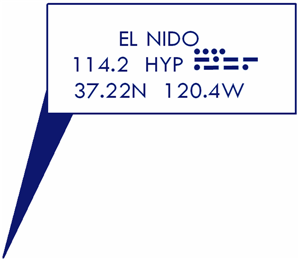
Resulting text string
<MultipleTextElement><TextBackground Units="Points"><Background Roundness="0"><Symbol><Outline Width="0.2"><CLR Red="13" Green="23" Blue="110"></CLR></Outline></Symbol></Background><Callout Tolerance="10.0" Snap="True" Truncated="0"><Symbol><Outline Width="0.2"><CLR Red="13" Green="23" Blue="110"></CLR></Outline><Fill><CLR Red="13" Green="23" Blue="110"></CLR></Fill><Arrowhead Size="0"><CLR Red="0" Green="0" Blue="0"></CLR></Arrowhead></Symbol></Callout><Shadow HorizontalOffset="0" VerticalOffset="0"><Symbol><Outline Width="0.2"><CLR Red="13" Green="23" Blue="110"></CLR></Outline><Fill><CLR Red="13" Green="23" Blue="110"></CLR></Fill></Symbol></Shadow><Margins Top="2.0" Bottom="2.0" Left="3.0" Right="6.0"></Margins><ElementPlacement><Top Style="Outside" SplitOffset="0" HAlign="Center" VAlign="Baseline"></Top><Left Style="TopCorner" SplitOffset="2.0" HAlign="Center" VAlign="Baseline"></Left><Right Style="Center" SplitOffset="0" HAlign="Center" VAlign="Baseline"></Right><Bottom Style="Edge" SplitOffset="0" HAlign="Center" VAlign="Baseline"></Bottom><Middle HAlign="Center" VAlign="Baseline"></Middle></ElementPlacement></TextBackground><MiddleTextElement><FNT name="TW Cen MT" size="3"><CLR Red="13" Green="23" Blue="110">EL NIDO
114.2  HYP</CLR></FNT><VMC><FNT name="PLTS Aeronautical VMC" size="3"><CLR Red="13" Green="23" Blue="110">HYP</CLR></FNT></VMC><FNT name="TW Cen MT" size="3"><CLR Red="13" Green="23" Blue="110">
37.22N  120.4W</CLR></FNT></MiddleTextElement></MultipleTextElement>
Resulting custom annotation
Example 3: Abbreviate annotation
In this sample, all the values are gathered for the visual specification, but not all the values should be displayed in the advanced callout. The abbreviation allows you to choose which pieces of information are displayed in the callout. It is created based on the expression that has been set up for the visual specification.
Function Generate([OBJECTID], [OBJECTID_arr], [LABELSTATUS_CODE], [LABELSTATUS_CODE_arr], [PRIMARYNAVAID_CODE], [PRIMARYNAVAID_CODE_arr], [SystemSubtype], [SystemSubtype_arr], [Ident_Txt], [Ident_Txt_arr], [Frequency_Val], [Frequency_Val_arr], [Channel_Txt], [Channel_Txt_arr], [Voice_Code], [Voice_Code_arr], [ComponentSubtype], [ComponentSubtype_arr], [Name_Txt], [Name_Txt_arr], [LAT_TXT], [LAT_TXT_arr], [LONG_TXT], [LONG_TXT_arr], [ROLEFIX_CODE], [ROLEFIX_CODE_arr])
VariableArray = Array([OBJECTID_arr], [LABELSTATUS_CODE_arr], [PRIMARYNAVAID_CODE_arr], [SystemSubtype_arr], [Ident_Txt_arr], [Frequency_Val_arr], [Channel_Txt_arr], [Voice_Code_arr], [ComponentSubtype_arr], [Name_Txt_arr], [LAT_TXT_arr], [LONG_TXT_arr], [ROLEFIX_CODE_arr])
k = 0
do while k < UBound(VariableArray) + 1
tempArray = VariableArray(k)
	i = 1
outputText = outputText & tempArray(0)
do while i < ubound(tempArray) + 1
outputText = outputText & "<>"
outputText = outputText & tempArray(i)
		i = i + 1
	loop
outputText = outputText & "||"
	k = k + 1
loop
Generate = outputText
End Function