ArcGIS Desktop

  • ArcGIS Pro
  • ArcMap

  • My Profile
  • 帮助
  • Sign Out
ArcGIS Desktop

ArcGIS Online

专为贵组织打造的制图平台

ArcGIS Desktop

全面的专业性 GIS

ArcGIS Enterprise

面向企业的 GIS

ArcGIS Developers

用于构建位置感知应用程序的工具

ArcGIS Solutions

适用于行业的免费模板地图和应用程序

ArcGIS Marketplace

获取适用于组织的应用程序和数据

  • 文档
  • 支持
Esri
  • 登录
user
  • 我的个人资料
  • 登出

ArcMap

  • 主页
  • 入门
  • 地图
  • 分析
  • 管理数据
  • 工具
  • 扩展模块

Updating an LRS intersection class

注:

This functionality will be removed from the next ArcMap release and added to ArcGIS Pro.

You might need to update your LRS intersection feature class if you have created new routes, retired routes, realigned routes, or reassigned routes. The LRS intersection class also needs to be updated if the intersection layers, such as administrative boundaries, are edited. The updated layer portrays the latest intersection locations of the network and the intersecting layers.

Turn on Editor Tracking for the network and intersecting layers to update the intersections at only the locations where editing of the intersecting layers has taken place. This option may result in saving significant amount of processing time. For more information on the Editor Tracking tool, see Enable Editor Tracking.

注:

An ArcGIS Desktop Advanced license is required to execute this tool.

注:

The following types of intersection points are not updated using this tool:

  • Points not part of the intersecting layers
  • Points added manually to the LRS intersection class
  • Points copied to the LRS intersection class
  • Points merged or appended to the LRS intersection class

注:

When intersections are updated, the following occurs:

  • If an intersection that once existed no longer exists upon running this tool, that intersection is deleted.
  • If the intersection location changed, the shape (point location) for the intersection is updated, maintaining the intersection ID.
  • If a feature intersects a route in multiple locations and the intersection locations change, the original intersection ID closest to the new location determines where the intersection is moved to.

Use the following procedure to update intersections.

  1. Right-click the LRS intersection feature class and click Update Intersections.
    Updating intersections

    The Regenerate Intersections dialog box appears.
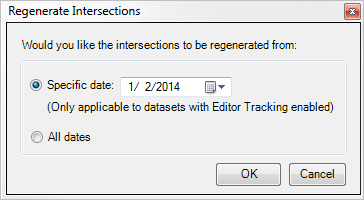
    Regenerate Intersections dialog box

  2. Select Specific Date to update the intersections.

    The intersections update using the applicable edits until the selected date. This option is only available for datasets with Editor Tracking enabled. If Editor Tracking is not enabled in any of the datasets, the Regenerate Intersections dialog box does not appear and the intersections are updated for the complete dataset.

    Select All Dates for updating the valid intersections until the last edit in the intersecting layers.

  3. Click OK.

    The intersections are updated.

相关主题

  • Creating an LRS intersection class using an existing intersection feature class
  • Adding and removing intersecting layers

ArcGIS Desktop

  • 主页
  • 文档
  • 支持

ArcGIS

  • ArcGIS Online
  • ArcGIS Desktop
  • ArcGIS Enterprise
  • ArcGIS
  • ArcGIS Developer
  • ArcGIS Solutions
  • ArcGIS Marketplace

关于 Esri

  • 关于我们
  • 招贤纳士
  • Esri 博客
  • 用户大会
  • 开发者峰会
Esri
分享您的想法。
Copyright © 2021 Esri. | 隐私政策 | 法律声明