获得 Production Mapping 许可后可用。
With some product specifications, polygons may need to be captured as point features if they do not meet a requirement for the area features. For instance, built-up areas that are less than 20 square miles in area may need to be point features rather than polygons. The Production Polygon To Point tool allows you to add points to selected polygons from a single feature class.
When polygons are converted to points, the new point features are attributed in the following manner:
- The point feature is automatically populated with the polygon's values for all common attributes.
- Any attributes that are only in the point feature class are populated using the point feature class's default values.
- If the IsVisible field is present, and the Simple check box is not checked, it is set to visible.
To expedite the conversion process, you can check the Simple check box, which prevents the Production Polygon To Point tool from calculating the feature angle. If this check box is not checked, the tool attempts to calculate the feature angle based on the longest segment on the polygon feature.
You can also choose to delete the polygon feature once it has been converted to a point. If the Delete Polygon check box is checked, the polygon feature is deleted once the point is created. If the check box is not checked, the polygon feature is not deleted.
- 启动 ArcMap。
- If necessary, load polygon features.
- 在主菜单上,单击自定义 > 工具条 > 生产编辑。
- 在主菜单上,单击自定义 > 工具条 > 高级生产编辑。
- 单击生产编辑工具条上的启动生产编辑按钮
 。
。
- Select the polygon features you want to convert to points.
- In the Feature Manager window, click the Create tab.
- Select the point template you want to use for the polygon conversion.
- Click the Production Polygon To Point button
 on the Production Editing Advanced toolbar.
The Production Polygon To Point dialog box appears.
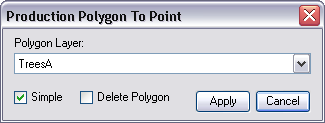
- Click the Polygon Layer drop-down arrow and choose the feature class that matches one of the polygons you have selected.
- Check the Simple check box if you want to prevent the Polygon To Point tool from calculating the feature angle.
- Check the Delete Polygon check box if you want to delete the polygon feature from the layer once the point is created.
- Click Apply.
A message appears indicating that the process is complete.
- 单击确定。