获得 Business Analyst 许可后可用。
You can create target maps based on a selection of target segments. This type of map is commonly referred to as hot spot analysis. To illustrate, you can create a target that includes four or five segments. The Target Map illustrates the block groups that are assigned these target segments. These maps help you find areas of your target segments. You can use these maps to direct your marketing efforts or locate a new site selection in areas where there are high concentrations of your target segments.
This type of map should only be produced at the block group level with Tapestry segmentation data. Specifically, these target maps can only be created where there are unique segmentation assignments for a level of geography.
The following is a practical example of how you can use this tool to help locate a new store and direct marketing efforts to the best locations. Assume that you have a store location in the San Diego, California, area. You have a set of customer records for this store location. This particular store has been very successful, and you would like to locate a new store in San Diego in an area where the same types of customers are located. Once the new store is constructed, you want to better direct your marketing efforts for the new store and reach as many of your target customers as possible.
You would start by creating a segmentation profile of the existing San Diego customers using the Create Profile By Table Geocoding tool. Then, you would create a segmentation profile of San Diego County using the Create Profile By Area Summation tool. Once the profiles are created, you can create a Customer Tapestry Profile Segmentation Report using these two profiles. The results of the profile indicate that your existing store has three core segments:
- 2—Suburban Splendor
- 4—Boomburbs
- 6—Sophisticated Squires
Each of these segments has an index and a percent composition that is relatively high. You can conclude that you are dominating in these segments because these segments have a high index and make up a large portion of your customers.
If you are going to locate a new store in the San Diego area, you will want to find a location that has a high concentration of these core target segments. For example, you would create a map that illustrates the areas (block groups) that are assigned to one of these three target segments within San Diego. Unlike the Segmentation Penetration Map, the Target Map simply illustrates areas that are uniquely assigned to one of the three target segments. By default, areas that are shaded red are included in the core selected target segments. The image below illustrates how this may look.
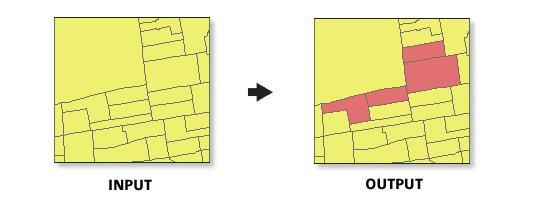
You can use this map to guide your real estate department in selecting a new store location. You can also use this map to direct your marketing efforts in these same ZIP Codes. For example, you may want to place advertisements on billboards in these areas. In both cases, the areas shaded red are the best locations.