获得 Business Analyst 许可后可用。
描述
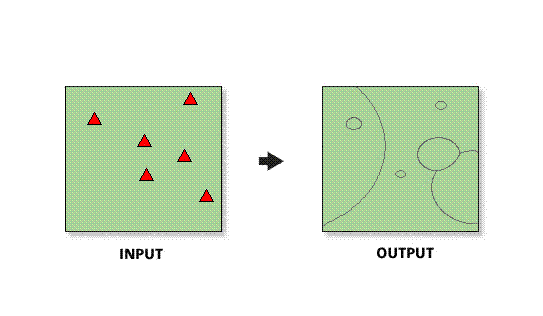
Generates areas of competitive advantage boundaries between stores weighted on one or more variables. These weights can be calculated based on the results of a Huff Model.
Learn more about how Huff's Equal Probability Trade Areas works
插图
使用方法
The spatial reference of the output feature class will be the same as the store layer.
The Store Layer input feature class must be point features.
In most cases, the Store Layer input feature layer will be a Business Analyst store layer.
The Distance Coefficient parameter determines how much of a factor distance is relative to each store.
The Distance Coefficient parameter value defaults to –1.5. The value is usually set between –1 and –3. The higher the number, the higher the impact distance will have on customer behavior. For example, a convenience store will have a low distance coefficient (between –2 and –3) because customers are not willing to travel for low-order goods.
语法
arcpy.ba.EqualProbabilityContours(StoreLayer, StoreIDField, All_Or_Single_Or_Selected, WayToDefineParams, DistanceCoefficient, AttractionVariables, OutputFeatureClass, {ByID_Or_ByName}, {Single_Site}, {PathToCalibratedResult})| 参数 | 说明 | 数据类型 |
StoreLayer | The input feature class containing center points for the trade areas. In most cases, this will be a Business Analyst store layer. | Feature Layer |
StoreIDField | Unique ID field in the store layer. | Field |
All_Or_Single_Or_Selected | Creates trade areas for points in the input feature layer.
| String |
WayToDefineParams | Selects the method to define the Huff Model parameters.
| String |
DistanceCoefficient | The value that determines how much of a factor distance (travel) affects consumer behavior. | Double |
AttractionVariables [[Variable, {Coefficient}],...] | The value that measures the perceived utility or how attractive a store is to consumers. If using the Python call, enter the values as a String in the following format: "FirstVariable 1;SecondVariable 2;ThirdVariable 3", etc. (Variable name, single space, an attraction coefficient, semi-colon delimited.) | Value Table |
OutputFeatureClass | The feature class that will contain the Huff probability trade area features. | Feature Class |
ByID_Or_ByName (可选) | Field used to select a single point.
| String |
Single_Site (可选) | ID or name of store that is to be used as the single point. | String |
PathToCalibratedResult (可选) | Output of a statistically calibrated Huff Model to use for calibration. | Folder |
代码示例
HuffsEqualProbabilityTradeAreas Example (Stand-alone Script)
# Name: EqualprobabilityContours.py
# Description: Generates Huff derived trade areas based on store sales.
# Author: Esri

# Import system modules
import arcview
import arcpy

arcpy.ImportToolbox(r"C:\Program Files (x86)\ArcGIS\Desktop10.8\Business Analyst\ArcToolbox\Toolboxes\Business Analyst Tools.tbx")

# Acquire extension license
arcpy.CheckOutExtension("Business")

# Define input and output parameters for the Huff Equal Probability Trade Areas tool
StoreLayer = "C:/temp/sf_store.shp"
StoreIDField = "STORE_ID"
All_Or_Single_Or_Selected = "ALL"
WayToDefineParams="MANUALLY"
DistanceCoefficient="-1.5"
AttractionVariables = "SALES 1"
OutputFeatureClass = "C:/temp/Output_Contour.shp"
ByID_Or_ByName=""
Single_Site=""
PathToCalibratedResult=""

# Create Huff Equal Probability trade areas
arcpy.EqualProbabilityContours_ba(StoreLayer,
						StoreIDField,
						All_Or_Single_Or_Selected,
						WayToDefineParams,
						DistanceCoefficient,
						AttractionVariables,
						OutputFeatureClass,
						ByID_Or_ByName,
						Single_Site,
						PathToCalibratedResults)


# Release extension license
arcpy.CheckInExtension("Business")
环境
此工具不使用任何地理处理环境。
许可信息
- Basic: 需要 Business Analyst
- Standard: 需要 Business Analyst
- Advanced: 需要 Business Analyst