获得 Business Analyst 许可后可用。
描述
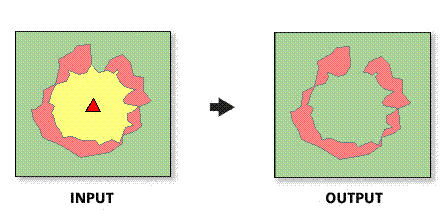
Creates a new feature class and report that analyze how trade areas have changed over time
插图
使用方法
The spatial reference of the output feature class will be the same as the first trade area layer.
Both trade area layers must be polygon feature classes.
This tool is primarily used to track changes in trade areas over time.
This tool is most often used with customer-derived trade areas that have been created with customer data captured at two different time periods or for different product groups.
In most cases, the trade area layers will be trade areas created with ESRI Business Analyst.
Only overlapping trade areas are valid inputs for this tool.
If no store layer is defined, the geographic center of the trade area will be used to calculate the index of similarity.
语法
arcpy.ba.MonitorTradeAreaChange(InputLayerParameterName1, IDFieldParameterName1, NameFieldParameterName1, InputLayerParameterName2, IDFieldParameterName2, NameFieldParameterName2, ReportNameParameterName, ReportTitleParameterName, ReportOutputDirectoryParameterName, OutputFeatureClass, {StoreLayerParameterName}, {StoreIDFieldParameterName}, {TAStoreIDFieldParameterName}, {ReportFormats})| 参数 | 说明 | 数据类型 |
InputLayerParameterName1 | The first trade area used in the Monitor Trade Area Change tool. This trade area will be compared to the second trade area to determine the amount of overlap. | Feature Layer |
IDFieldParameterName1 | The unique ID for the first trade area. | Field |
NameFieldParameterName1 | The unique name for the first trade area. | Field |
InputLayerParameterName2 | The second trade area used in the Monitor Trade Area Change tool. This trade area will be compared to the first trade area to determine the amount of overlap. | Field |
IDFieldParameterName2 | The unique ID for the second trade area. | Feature Layer |
NameFieldParameterName2 | The unique name for the second trade area. | Field |
ReportNameParameterName | Name of the report. | String |
ReportTitleParameterName | Title of the report. | String |
ReportOutputDirectoryParameterName | Report is created in this output folder. | Folder |
OutputFeatureClass | The output feature class that will contain the trade area overlap features. | Feature Class |
StoreLayerParameterName (可选) | The layer used for each trade area to calculate an index of similarity. In most cases, this will be a Business Analyst store layer. | Feature Layer |
StoreIDFieldParameterName (可选) | The unique ID for the store layer. | Field |
TAStoreIDFieldParameterName (可选) | The ID field that associates the store layer with the trade area layer. | Field |
ReportFormats [ReportFormats,...] (可选) | Select the desired report output format
| String |
代码示例
MonitorTradeAreaChange Example (Stand-alone Script)
# Name: MonitorTradeAreaChange.py
# Description: Calculates the percent change between two overlapping trade areas.
# Author: Esri

# Import system modules
import arcview
import arcpy

arcpy.AddToolbox("C:\Program Files (x86)\ArcGIS\Desktop10.3\Business Analyst\ArcToolbox\Toolboxes\Business Analyst Tools.tbx")

try:
# Acquire extension license
  arcpy.CheckOutExtension("Business")

# Define input and output parameters for the Monitor Trade Area Change tool
  TradeArea1 = "C:/temp/TradeArea1.shp"
  ID1 = "AREA_ID"
  Name1 = "NAME"
  TradeArea2 = "C:/temp/TradeArea2.shp"
  ID2 = "AREA_ID"
  Name2 = "NAME"
  RptName = "Monitor TA Report Name"
  RptTitle = "Monitor TA Report Title"
  RptPath = "C:/temp/Reports"
  Output = "C:/temp/Output_TAChange.shp"

# Create a Monitor Trade Area output
  arcpy.MonitorTradeAreaChange_ba(TradeArea1, ID1, Name1, TradeArea2, ID2, Name2, RptName, RptTitle, RptPath, Output)

# Release extension license
  arcpy.CheckInExtension("Business")

except:
  print arcpy.GetMessages(2)
环境
此工具不使用任何地理处理环境。
许可信息
- Basic: 需要 Business Analyst
- Standard: 需要 Business Analyst
- Advanced: 需要 Business Analyst