ArcGIS Desktop

  • ArcGIS Pro
  • ArcMap

  • My Profile
  • Hilfe
  • Sign Out
ArcGIS Desktop

ArcGIS Online

Die Mapping-Plattform für Ihre Organisation

ArcGIS Desktop

Ein vollständiges professionelles GIS

ArcGIS Enterprise

GIS in Ihrem Unternehmen

ArcGIS for Developers

Werkzeuge zum Erstellen standortbezogener Apps

ArcGIS Solutions

Kostenlose Karten- und App-Vorlagen für Ihre Branche

ArcGIS Marketplace

Rufen Sie Apps und Daten für Ihre Organisation ab.

  • Dokumentation
  • Support
Esri
  • Anmelden
user
  • Eigenes Profil
  • Abmelden

ArcMap

  • Startseite
  • Erste Schritte
  • Karte
  • Analysieren
  • Verwalten von Daten
  • Werkzeuge
  • Erweiterungen

Setting the feature zoom

Mit der Data Reviewer-Lizenz verfügbar.

The feature zooming options allow you to configure the working scale for your data and a zooming factor when records are selected in the Reviewer table. The working scale defines the scale that is used when you zoom to geometry or features in the map. The fixed zoom factor determines how much the map is zoomed out so the geometry or feature is visible. Both of these properties work with the Reviewer table records and the Browse Features dialog box.

  1. Start ArcMap.
  2. On the main menu, click Customize > Toolbars > Data Reviewer.
  3. Start a Reviewer session in one of the following:
    • A file, personal, or SQL Server Express geodatabase
    • An enterprise geodatabase
    • An existing Reviewer workspace
  4. Click the Reviewer Table button Reviewer Table on the Data Reviewer toolbar.
  5. Click the Reviewer Table Properties button Reviewer Table Properties on the Reviewer Table window.

    The Reviewer Table Properties dialog box appears.
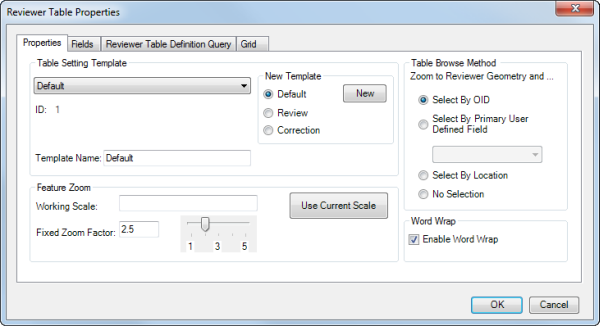
    Properties tab

  6. Type the scale you want to use with the Reviewer table records in the Working Scale text box.

    The value you type in this field represents the scale that is going to be used when you zoom to Reviewer or feature geometry for an item in the Reviewer table.

  7. Type a value in the Fixed Zoom Factor text box or move the slider to indicate how much to zoom in to the feature.

    Hinweis:

    If both the working scale and the fixed zoom factor are set, the working scale overrides the fixed zoom factor.

  8. Klicken Sie auf OK.

Verwandte Themen

  • Fields in the Reviewer table

ArcGIS Desktop

  • Startseite
  • Dokumentation
  • Support

ArcGIS Plattform

  • ArcGIS Online
  • ArcGIS Desktop
  • ArcGIS Enterprise
  • ArcGIS for Developers
  • ArcGIS Solutions
  • ArcGIS Marketplace

Über Esri

  • Über uns
  • Karriere
  • Esri Blog
  • User Conference
  • Developer Summit
Esri
Wir sind an Ihrer Meinung interessiert.
Copyright © 2019 Esri. | Datenschutz | Rechtliches