ArcGIS for Desktop

  • Documentation
  • Pricing
  • Support

  • My Profile
  • Help
  • Sign Out
ArcGIS for Desktop

ArcGIS Online

The mapping platform for your organization

ArcGIS for Desktop

A complete professional GIS

ArcGIS for Server

GIS in your enterprise

ArcGIS for Developers

Tools to build location-aware apps

ArcGIS Solutions

Free template maps and apps for your industry

ArcGIS Marketplace

Get apps and data for your organization

  • Documentation
  • Pricing
  • Support
Esri
  • Sign In
user
  • My Profile
  • Sign Out

Help

  • Home
  • Get Started
  • Map
  • Analyze
  • Manage Data
  • Tools
  • More...

Removing objects from docking settings

As workflows change, you may not need all the toolbars and windows included in a setting. When this occurs, you can remove a specific toolbar or window so it no longer appears in ArcMap when you load the docking setting.

For instance, if you do not want the Map Cache toolbar to appear in ArcMap when you are editing data, it could be removed from the Editing setting. This would prevent the Map Cache toolbar from being loaded with the other toolbars and windows in the docking setting.

  1. Start ArcMap.
  2. On the main menu, click Customize > Production Mapping > Toolbar Settings > Docking Manager.

    The Docking Manager dialog box appears.
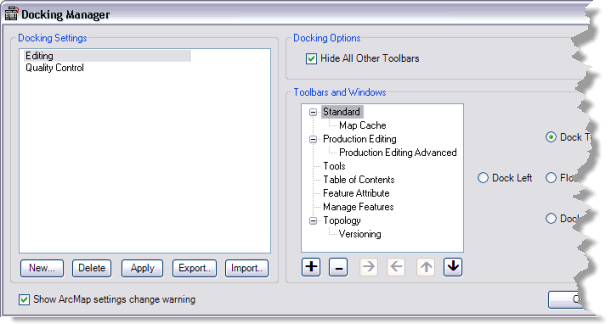
    Docking Manager dialog box
  3. Choose a docking setting from the Docking Settings list.
  4. Choose an object in the Toolbars and Windows list.
  5. Click the Delete Selected Dockable Object button Delete Selected Dockable Object.

    The selected object is removed from the Toolbars and Windows list.

    Tip:

    You can view the updated framework by clicking Apply.

  6. Click OK.

Related topics

  • Creating a new docking setting
  • Adding objects to a docking setting

ArcGIS for Desktop

  • Home
  • Documentation
  • Pricing
  • Support

ArcGIS Platform

  • ArcGIS Online
  • ArcGIS for Desktop
  • ArcGIS for Server
  • ArcGIS for Developers
  • ArcGIS Solutions
  • ArcGIS Marketplace

About Esri

  • About Us
  • Careers
  • Insiders Blog
  • User Conference
  • Developer Summit
Esri
Tell us what you think.
© Copyright 2016 Environmental Systems Research Institute, Inc. | Privacy | Legal