ArcGIS for Desktop

  • Documentation
  • Pricing
  • Support

  • My Profile
  • Help
  • Sign Out
ArcGIS for Desktop

ArcGIS Online

The mapping platform for your organization

ArcGIS for Desktop

A complete professional GIS

ArcGIS for Server

GIS in your enterprise

ArcGIS for Developers

Tools to build location-aware apps

ArcGIS Solutions

Free template maps and apps for your industry

ArcGIS Marketplace

Get apps and data for your organization

  • Documentation
  • Pricing
  • Support
Esri
  • Sign In
user
  • My Profile
  • Sign Out

Help

  • Home
  • Get Started
  • Map
  • Analyze
  • Manage Data
  • Tools
  • More...

Renaming a docking setting

Once a docking setting has been created, it can be renamed to better fit the theme of the group of toolbars and windows. For instance, you could change the name of a group of toolbars and windows for editing to Data Editing.

  1. Start ArcMap.
  2. On the main menu, click Customize > Production Mapping > Toolbar Settings > Docking Manager.

    The Docking Manager dialog box appears.
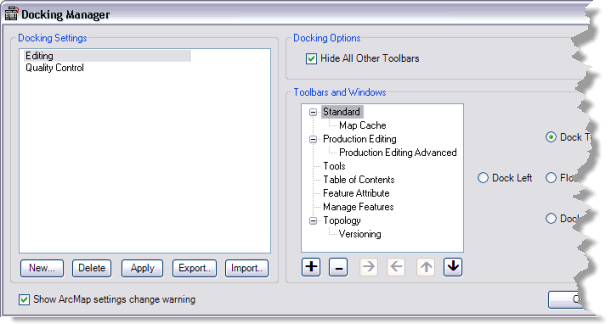
    Docking Manager dialog box
  3. Choose a docking setting in the Docking Settings list.
  4. Press the F2 key.

    The setting name becomes editable.

  5. Type a new name for the docking settings and press ENTER.
  6. Click OK.

Related topics

  • Creating a new docking setting

ArcGIS for Desktop

  • Home
  • Documentation
  • Pricing
  • Support

ArcGIS Platform

  • ArcGIS Online
  • ArcGIS for Desktop
  • ArcGIS for Server
  • ArcGIS for Developers
  • ArcGIS Solutions
  • ArcGIS Marketplace

About Esri

  • About Us
  • Careers
  • Insiders Blog
  • User Conference
  • Developer Summit
Esri
Tell us what you think.
© Copyright 2016 Environmental Systems Research Institute, Inc. | Privacy | Legal