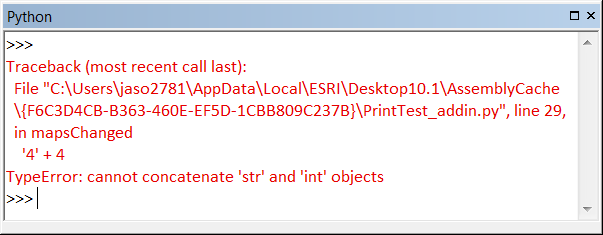
When an add-in fails to work, it is commonly due to a coding or syntax error in the Python script. To discover what exception is being raised, open the Python window in ArcGIS. The exception is automatically printed to the Python window, providing the exact location and cause of the error:
Using print statements
While developing your Python add-in, you can use print statements in your Python script to print variable values and informative messages to the Python window (the print statements appear in the Python window similarly to the illustration above). Using print statements to follow your add-in process can help ensure that correct values are being generated and used and the results are valid. Print statements can be removed before sharing and deploying the add-in.
Missing tool or button
Anytime a tool or button fails to load and displays Missing on the toolbar instead of the expected icon or name, it is commonly due to a Python syntax error. Recheck your Python script for syntax errors or incorrect inputs to Python functions.
Testing the add-in
Once the errors have been discovered and fixed in your Python script, it is important to retest the add-in. This requires re-creating the .esriaddin file. See Testing an add-in for details.