ArcGIS Desktop

  • ArcGIS Pro
  • ArcMap

  • My Profile
  • Help
  • Sign Out
ArcGIS Desktop

ArcGIS Online

The mapping platform for your organization

ArcGIS Desktop

A complete professional GIS

ArcGIS Enterprise

GIS in your enterprise

ArcGIS Developers

Tools to build location-aware apps

ArcGIS Solutions

Free template maps and apps for your industry

ArcGIS Marketplace

Get apps and data for your organization

  • Documentation
  • Support
Esri
  • Sign In
user
  • My Profile
  • Sign Out

ArcMap

  • Home
  • Get Started
  • Map
  • Analyze
  • Manage Data
  • Tools
  • Extensions

Determine market penetration

Available with Business Analyst license.

  • Overview
  • Input Prerequisites
  • Example Output

Overview

Market penetration calculates the number of customers within an area compared to a base demographic variable, such as total population.

Note:

Determine Market Penetration can be run in the background or foreground in the 64-bit environment. Business Analyst 64-bit background geoprocessing is installed during the product setup and is the default processing option. You can switch between background or foreground options from Geoprocessing menu > Geoprocessing Options > Background Geoprocessing section. Running tasks in the background allows you to continue your work in ArcMap as the task executes.

To enable, or disable, background processing navigate to the General tab of the tool properties and check, or uncheck, the Always run in foreground check box.

Read more about 64-bit Background Geoprocessing.

Input Prerequisites

Customer data is required to precisely determine the market penetration.

Example Output

In the image below, customers and the values tied to each customer (such as dollars spent) are analyzed across an entire market and locally in each geographic boundary. This allows you to determine how well you are penetrating an area compared to other areas.
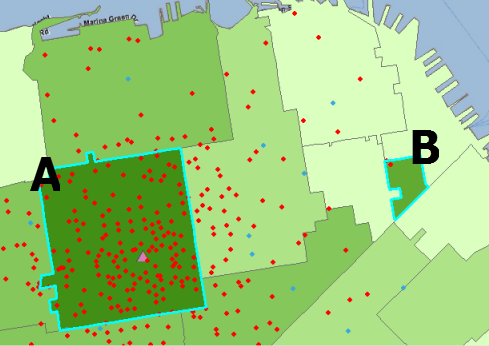
Market Penetration

Note:
As listed in the far right field, of the table, below (BA_MKT_P), Areas A and B both have high penetration rates (above 10% of the market). Area B only has 2 customers out of a base of 304.25 but since a weighted variable has been used (sales), the number of customers used in the penetration calculation is 31.58 (31.58 / 304.25 * 100 = 10.38). The adjusted number of customers, based on weighting, can be seen in the field titled “BA_CUSTW.”
Market penetration rates

  • BA_CUST - the number of customers in each trade area or boundary.
  • BA_TCUST - the total number of customers in the analysis.
  • BA_PCUST - the percentage of customers in each trade area boundary. Formula: (BA_CUST/BA_TCUST)*100
  • BA_CUSTW, BA_TCUSTW and BA_PCUSTW - these fields are the same as the customer fields on the left except these are based on weights. This is often sales per customer or an expenditure value.
  • BA_BASEVAL - the base market value for calculating penetration (total market count) and is often shown as total households or population.
  • BA_MKT_P - the market penetration rate. In this example, it is weighted by sales. Formula: (BA_CUSTW/BA_BASEVAL)*100. When customer counts are used in place of weighted values the formula is (BA_CUST/BASEVAL)*100.

Learn more about Market Penetration.

ArcGIS Desktop

  • Home
  • Documentation
  • Support

ArcGIS

  • ArcGIS Online
  • ArcGIS Desktop
  • ArcGIS Enterprise
  • ArcGIS
  • ArcGIS Developer
  • ArcGIS Solutions
  • ArcGIS Marketplace

About Esri

  • About Us
  • Careers
  • Esri Blog
  • User Conference
  • Developer Summit
Esri
Tell us what you think.
Copyright © 2022 Esri. | Privacy | Legal