ArcGIS Desktop

  • ArcGIS Pro
  • ArcMap

  • My Profile
  • Help
  • Sign Out
ArcGIS Desktop

ArcGIS Online

The mapping platform for your organization

ArcGIS Desktop

A complete professional GIS

ArcGIS Enterprise

GIS in your enterprise

ArcGIS Developers

Tools to build location-aware apps

ArcGIS Solutions

Free template maps and apps for your industry

ArcGIS Marketplace

Get apps and data for your organization

  • Documentation
  • Support
Esri
  • Sign In
user
  • My Profile
  • Sign Out

ArcMap

  • Home
  • Get Started
  • Map
  • Analyze
  • Manage Data
  • Tools
  • Extensions

Fields Tab

Available with Business Analyst license.

The Fields tab indicates what fields contain the information needed to geocode a record. Based on their names, Address Coder will attempt to assign them to the proper fields. If you are processing a fixed field file, a Fields button appears that will allow you to indicate how to parse the record. For Excel and delimited files, a check box appears indicating whether or not there is a header record.

If a Volumetric field is specified, the field must contain numeric data. Each record will be weighted by this data on Tapestry Profile reports.
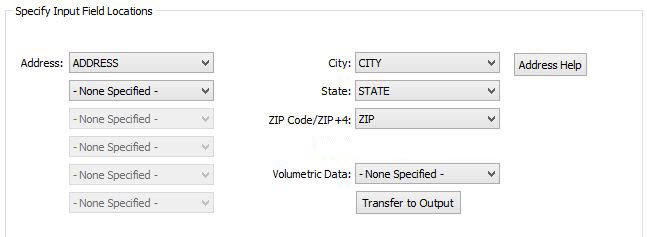
Input Field Locations
Note:

Some options and data variables may vary based on the locator being used.

Fixed Field

When processing a fixed field file, it is necessary to define the width of every field in the file. Initially, Address Coder will show one field having the full width of the record. You will need to add sufficient column definitions for every field in your file, then adjust their widths. The lower box shows you how the current definitions are breaking up the record.

To add a new column definition, simply enter the name and width and click Add New and it will be added to the list on the left. To make changes, select an item on the left, make the needed adjustments in the Name and Width text boxes, then click Replace.

Tip:

Address Coder will attempt to assign the address fields based on the column/field labels that exist in your file. If your file does not have column/field labels (generally this applies to text files), you should determine the layout ahead of time by viewing the file in a text editor.

Address Coder looks for key words like Address, Street, City, Town, State, ZIP, Postal, Company, and Firm when trying to assign the fields in your file. In most files, address fields can be broken into two types: those fields that pertain to the street address and those that pertain to the last line (city, state, and ZIP Code).

The address list boxes should be used to assign the fields that contain the street address, apartment number, and any other information that will help locate the record excluding the city, state, and ZIP Code fields. Fields that contain the city, state, and ZIP Code should be assigned in that order; that is, city before state and state before ZIP Code. If your file contains one field for both the city and state, that should be listed before the field containing the ZIP Code.

ArcGIS Desktop

  • Home
  • Documentation
  • Support

ArcGIS

  • ArcGIS Online
  • ArcGIS Desktop
  • ArcGIS Enterprise
  • ArcGIS
  • ArcGIS Developer
  • ArcGIS Solutions
  • ArcGIS Marketplace

About Esri

  • About Us
  • Careers
  • Esri Blog
  • User Conference
  • Developer Summit
Esri
Tell us what you think.
Copyright © 2022 Esri. | Privacy | Legal