Available with Standard or Advanced license.
The maps that are used by your jobs can be stored in the ArcGIS Workflow Manager (Classic) repository through the Workflow Manager Administrator application.
- Start Workflow Manager Administrator and connect to your Workflow Manager (Classic) database.
There is already a preconfigured map.
- Choose the Maps folder.
If maps already exist, they appear in the list to the right.
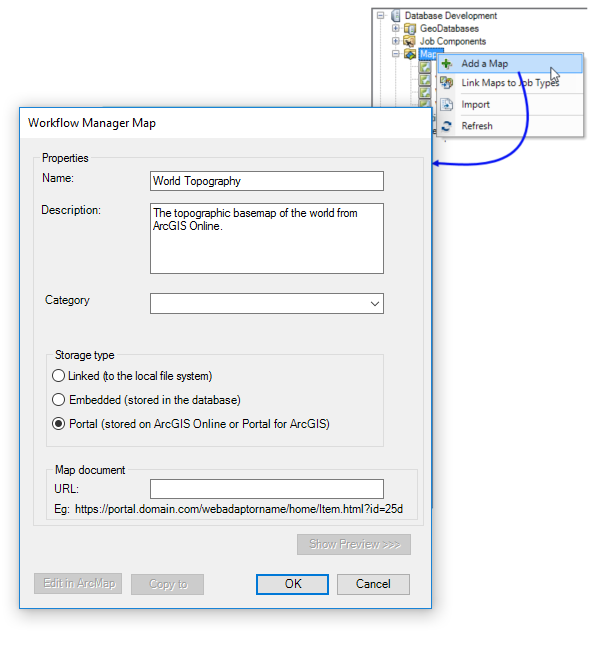
- Right-click the Maps folder and click Add a Map.
The Workflow Manager Map dialog box appears.
- Configure the properties of the map—name, description, and category.
- Configure how the map will be stored in Workflow Manager (Classic).
- Choose Linked to store it on a file system.
Workflow Manager (Classic) stores the path location of this map document. This is a good option if database space is an issue.
- Choose Embedded to import the map into the database.
- Choose Portal to link to a map stored in ArcGIS Online or Portal for ArcGIS. The map can be an ArcGIS Pro map (.mapx), a layout (.pagx), or a web map.
- Choose Linked to store it on a file system.
- Click the browse button (...) near the folder to browse to the desired map document.
The Browse dialog box appears.
- Choose the file and click Open.
- Click OK on the Workflow Manager Map dialog box.
The map is added to the ArcGIS Workflow Manager (Classic) system and is ready to be used.