Available with Standard or Advanced license.
Prerequisite:
- Installation of ArcGIS Workflow Manager (Classic) Desktop
- Creation of Workflow Database completed
- Local connection to database set up
Workflow Manager (Classic) provides tools for administrators to send configuration elements from one repository to another. For example, you can send job types from one database repository to another. This will also transfer all the dependent elements of that job type, like step types, maps, and extended properties.
- Connect to the source Workflow Manager (Classic) database you want to send elements from.
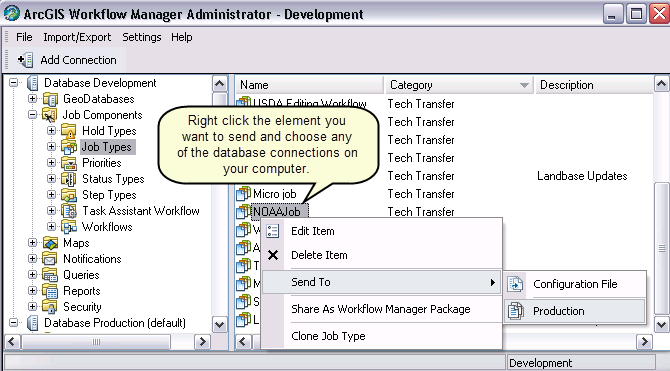
- Expand the folder and select the item you want to send.
- Right-click and click Send To.
- Select the destination database you want to send the element to.
The list will contain all the existing Workflow Manager (Classic) repositories in your default database location. You also have an option to export to a Workflow Manager (Classic) configuration file. This allows you to save to disk and import manually later.
The selected configuration element will automatically be added to the database chosen. Workflow Manager (Classic) will establish a connection to that database and import the new configuration element. If the current user is not an administrator on the destination database, a message box is presented to the user explaining they are not an administrator on the selected database.