The Create Feature-Linked Annotation tool creates annotation for features for a specific product if it does not already have annotation. During the annotation creation process, this tool also deletes new pieces of annotation that have no label or whose text element is null.
This tool is enabled in ArcMap when you are not in an edit session. A feature-linked annotation layer will only be displayed in the annotation layer list if its source feature class is loaded in the table of contents.
This tool can also be run as a CreateFeatureLinkedAnnotation ArcPyProduction function.
Viewing statistics on the annotation
After the annotation has been created, the Create Feature-Linked Annotation dialog box appears and displays information about the annotation that has been generated or deleted.
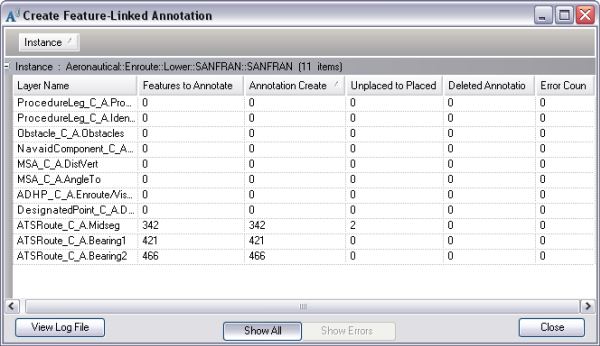
The fields in the dialog box include the following:
- Annotation Sublayer—The name of the annotation layer and subtype that has been processed. The name of the annotation layer is given as <layer name>.<sublayer name>.
- Features to Annotate—The number of pieces of annotation that have been generated.
- Placed Annotation—The number of pieces of annotation that could be placed on the map.
- Unplaced Annotation—The number of pieces of annotation that could not be placed on the map.
- Deleted Annotation—The number of pieces of annotation that have been deleted from the annotation layer or sublayer.
- Errors—If errors occur during the creation of annotation, this column is populated with one of the following errors.
Error Description Suggested Action Setting MapIds
Error setting MapIds for the newly created annotation features
Delete the annotation with Null MapIds and rerun the Create Feature-Linked Annotation tool.
Updating Annotation
Error updating annotation
Run the Update Annotation tool.
Converting Multipart
Error converting the annotation to a Multiple Text Element
Check if the text string is a valid XML.
Updating Mapscale
Error updating the size of the annotation based on the map scale
Run the Update Annotation tool.
Running Post Process
Error running Update Background Symbol Color for annotation features
Run the Update Annotation tool.
Errors and resolutions when annotation is added