サマリー
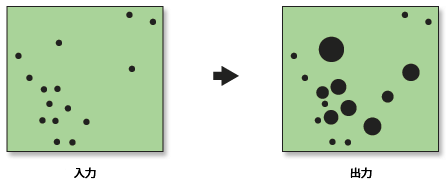
等級シンボル レンダリングをフィーチャクラスの数値フィールドに適用します。
図
使用法
[カウントのレンダリング処理(Count Rendering)] ツールは、数量を円形でレンダリングします。円形のサイズが値の大きさを表します。このツールの出力は、新しいレイヤ ファイル(*.lyr)です。
フィーチャが持つ数量情報をシンボルの大きさに反映することにより、その数量の空間パターンが明らかになることがあります。
[フィールドの最大値] の値を指定しない場合、これは [レンダリング処理対象のフィールド] の最大値に設定されます。いくつかの等級シンボル マップを比較するときに、[フィールドの最大値] パラメータを使用します。一連のマップについて [フィールドの最大値] を同じ値に設定することで、データ範囲が異なる場合でも、円のサイズのスケーリングをそろえることができます。
構文
CountRenderer_stats (input_feature_class, field_to_render, output_layer_file, number_of_classes, symbol_color, {maximum_field_value})| パラメーター | 説明 | データ タイプ |
input_feature_class | レンダリングするカウント データが含まれているフィーチャ レイヤ。 | Feature Layer |
field_to_render | カウント データが含まれているフィールドの名前。 | Field |
output_layer_file | レンダリング情報が含まれている新しい出力レイヤ ファイル。ファイル名の一部として、*.lyr 拡張子を含める必要があります。 | Layer File |
number_of_classes | 入力フィーチャクラスが分類されるクラスの数。 | Long |
symbol_color | 等級シンボルの色。
| String |
maximum_field_value (オプション) | レンダリングされる最大属性値。フィールド値がこの最大値よりも大きいフィーチャは描画されません。 | Double |
コードのサンプル
CountRenderer(カウントのレンダリング処理)の例 1(Python ウィンドウ)
次の Python ウィンドウのスクリプトは、CountRenderer(カウントのレンダリング処理)ツールを使用する方法を示しています。
import arcpy
arcpy.env.workspace = "c:/data"
arcpy.CountRenderer_stats("autotheft_weighted.shp", "Count", "auto_weight_rendered.lyr", "5", "mango","#")
CountRenderer(カウントのレンダリング処理)の例 2(スタンドアロン Python スクリプト)
次のスタンドアロン Python スクリプトは、CountRenderer(カウントのレンダリング処理)ツールを使用する方法を示しています。
# Convert incident data to weighted point data and render

# Import system modules
import arcpy, sys, string, os

# Local variables...
workspace = "C:/data"
input = "AutoTheft.shp"
input_weighted = "autotheft_weighted.shp"
results_field = "Count"
input_weighted_rendered = "auto_weight_rendered.lyr"

try:
    # Set the current workspace (to avoid having to specify the full path to the feature classes each time)
    arcpy.env.workspace = workspace

    # Process: Collect Events...
    arcpy.CollectEvents_stats(input, input_weighted, results_field)

    # Process: Count Rendering...
    arcpy.CountRenderer_stats(input_weighted, results_field, input_weighted_rendered, "5", "MANGO", "#")

except:
    # If an error occurred when running the tool, print out the error message.
    print arcpy.GetMessages()
環境
ライセンス情報
- ArcGIS Desktop Basic: はい
- ArcGIS Desktop Standard: はい
- ArcGIS Desktop Advanced: はい