ArcGIS Desktop

  • ArcGIS Pro
  • ArcMap

  • My Profile
  • Справка
  • Sign Out
ArcGIS Desktop

ArcGIS Online

Картографическая платформа вашей организации

ArcGIS Desktop

Полноценная профессиональная ГИС

ArcGIS Enterprise

ГИС предприятия

ArcGIS Developers

Инструменты для встраивания приложений с местоположениями

ArcGIS Solutions

Бесплатные шаблоны карт и приложений для отрасли

ArcGIS Marketplace

Получение приложения и данных для вашей организации.

  • Документация
  • Поддержка
Esri
  • Войти
user
  • Мой профиль
  • Выход

ArcMap

  • На главную
  • Начало работы
  • Карта
  • Анализ
  • Управление данными
  • Инструменты
  • Дополнительные модули

Managing cells and rows in data source filtering

Доступно с лицензией Production Mapping.

To further refine data source filtering, you can copy, delete, sort rows, or copy cells from the Filter area of the Data Filters dialog box.

  1. Запустите ArcMap.
  2. Verify that you are in layout view if necessary.
  3. Right-click the graphic table element and click Properties.

    The Table Properties dialog box appears.

  4. If necessary, click the Data Source tab.

    The Data Source tab appears.
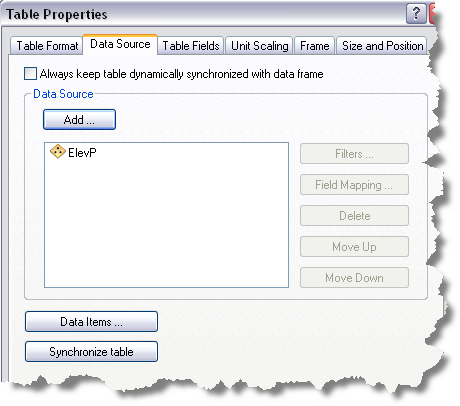
    Data Source tab
  5. Click the data source you want to use in the Data Source list on the Data Source tab.

    The chosen data source is highlighted, and the Filters button becomes available.

  6. Click Filters.

    The Data Filters dialog box appears.

    Data Filters dialog box with filters
  7. Perform one of the following from the Filter area of the Data Filters dialog box, if necessary:
    • To copy a cell, right-click an operator or filter type cell in the Filter area and click Copy Cell.
    • To copy a row, right-click an operator or filter type row in the Filter area and click Copy Selected Row.
    • To delete a row, right-click a row in the Filter area and click Delete.
    • To sort a row, right-click a row in the Filter area and click Move Up or Move Down.
  8. Click OK to save changes to the data filters.

Связанные разделы

  • What is a graphic table element?
  • A quick tour of the graphic table element

ArcGIS Desktop

  • На главную
  • Документация
  • Поддержка

ArcGIS

  • ArcGIS Online
  • ArcGIS Desktop
  • ArcGIS Enterprise
  • ArcGIS
  • ArcGIS Developer
  • ArcGIS Solutions
  • ArcGIS Marketplace

Об Esri

  • О нас
  • Карьера
  • Блог Esri
  • Конференция пользователей
  • Саммит разработчиков
Esri
Расскажите нам, что вы думаете.
Copyright © 2021 Esri. | Конфиденциальность | Правовая информация