ArcGIS Desktop

  • ArcGIS Pro
  • ArcMap

  • My Profile
  • 帮助
  • Sign Out
ArcGIS Desktop

ArcGIS Online

专为贵组织打造的制图平台

ArcGIS Desktop

全面的专业性 GIS

ArcGIS Enterprise

面向企业的 GIS

ArcGIS Developers

用于构建位置感知应用程序的工具

ArcGIS Solutions

适用于行业的免费模板地图和应用程序

ArcGIS Marketplace

获取适用于组织的应用程序和数据

  • 文档
  • 支持
Esri
  • 登录
user
  • 我的个人资料
  • 登出

ArcMap

  • 主页
  • 入门
  • 地图
  • 分析
  • 管理数据
  • 工具
  • 扩展模块

Copying a part of a feature to the target

在 Standard 或 Advanced 许可等级下可用。

获得 Production Mapping 许可后可用。

Production Mapping provides several functions for working with multipart features.
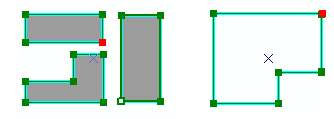
Examples of multipart polygon and polyline features
Examples of Multipart Polygon and Polyline Features

For instance, you can copy geometry from part of the feature as a new feature active template. This creates a new feature in the template's layer that has the geometry of the selected part of the original feature. The original feature and all its parts are not removed.

Parts copied to target templates
Parts of Polygon and Line Features That Have Been Copied to the Current Target Template as Features
  1. 启动 ArcMap。
  2. 如有必要,可在地图中加载数据。
  3. 在主菜单上,单击自定义 > 工具条 > 生产编辑。
  4. 单击生产编辑工具条上的启动生产编辑按钮 Production Start Editing。

    注:

    使用启动生产编辑工具开始编辑会话时,系统将自动显示管理要素和创建属性、更新属性或元数据属性窗口。

    提示:

    如果开始编辑会话时未显示创建属性、更新属性或元数据属性窗口,请单击管理要素窗口上的显示/隐藏属性按钮 Show/Hide Attributes。

  5. Select a multipart feature.
  6. Ensure that the template you want to use to create new features is set as the active template on the Create tab of the Manage Features window.
  7. Click the Edit Vertices button Edit Vertices on the Production Editing toolbar.
  8. Right-click a node on the feature and click Copy Part to Target.

A new feature is created with the geometry of the selected part of the feature and the attributes of the template.

相关主题

  • Converting a part to a feature

ArcGIS Desktop

  • 主页
  • 文档
  • 支持

ArcGIS

  • ArcGIS Online
  • ArcGIS Desktop
  • ArcGIS Enterprise
  • ArcGIS
  • ArcGIS Developer
  • ArcGIS Solutions
  • ArcGIS Marketplace

关于 Esri

  • 关于我们
  • 招贤纳士
  • Esri 博客
  • 用户大会
  • 开发者峰会
Esri
分享您的想法。
Copyright © 2021 Esri. | 隐私政策 | 法律声明