获得 Production Mapping 许可后可用。
Data source filtering allows you to define which data items (features) will be returned for each layer. You can define a data filter for each data source. Each data source can be filtered to only return the data you want to include in the table.
The Data Filters dialog box is divided into two areas:
- Base Selection--Allows you to choose an extent to determine which features are included in the table
- Entire Source—Uses all features from the data source
- Selected Set—Uses only selected features from the data source
- Visible Extent—Uses only the features from the data source that are within the data frame's visible extent to populate the table
- Honor Definition Query—Applies a definition query that has been defined for the layers being used as the data source
- Filter--Allows you to define expressions that additionally filter the features based on attributes, location, sorting, uniqueness, or maximum number returned
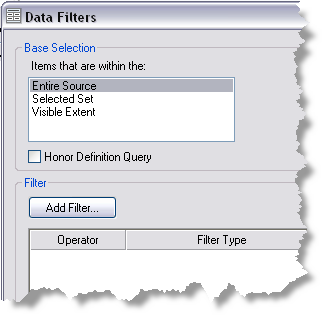
Clicking Add Filter in the Filter area allows you to filter by the following:
- Attributes—Uses one or more feature attributes
- Location—Uses a location layer and filter method
- Sorted list—Uses sorted table fields
- Unique values—Returns one occurrence of any repeating value
- Limit—Limits the maximum number of items returned
These filters can be logically appended to the base selections using the And, Or, greater than (>), or less than (<) operators (but not the equal to [=] or exclusive or [XOR] operators).