ArcGIS for Desktop

  • Documentation
  • Pricing
  • Support

  • My Profile
  • Help
  • Sign Out
ArcGIS for Desktop

ArcGIS Online

The mapping platform for your organization

ArcGIS for Desktop

A complete professional GIS

ArcGIS for Server

GIS in your enterprise

ArcGIS for Developers

Tools to build location-aware apps

ArcGIS Solutions

Free template maps and apps for your industry

ArcGIS Marketplace

Get apps and data for your organization

  • Documentation
  • Pricing
  • Support
Esri
  • Sign In
user
  • My Profile
  • Sign Out

Help

  • Home
  • Get Started
  • Map
  • Analyze
  • Manage Data
  • Tools
  • More...

Favorites

  • About

About

Favorites are a customizable collection of Business Analyst shortcuts for opening commands directly. This allows you to set and maintain commonly used features while bypassing their normal locations throughout the Business Analyst menu. For example, if you are constantly using Hot Spots and Customer Derived Areas, you can add them to Favorites and access them directly. You no longer have to step through the additional wizard dialog boxes to find them.

You can add Business Analyst commands to Favorites. For example, you can add shortcut commands from the Geocoding or Editor toolbars.

Right-click the Favorites section for a shortcut menu that allows you to customize the command views. For example, you can use large or small command icons or add the command text descriptions.
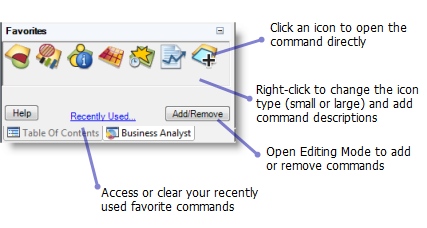
Favorites

Here is an example of the Favorites section in Editing Mode:
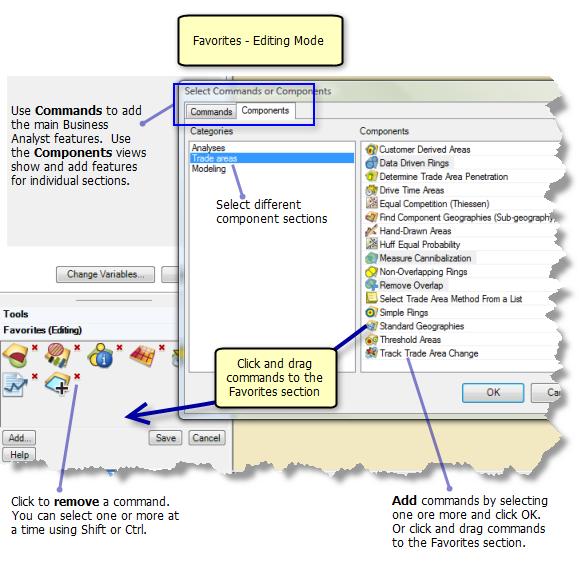
Favorites - Editing Mode
Tip:

There is a default set of seven Favorites commands. You can return to the defaults by selecting Restore Defaults in the Editing Mode.

Feedback on this topic?

ArcGIS for Desktop

  • Home
  • Documentation
  • Pricing
  • Support

ArcGIS Platform

  • ArcGIS Online
  • ArcGIS for Desktop
  • ArcGIS for Server
  • ArcGIS for Developers
  • ArcGIS Solutions
  • ArcGIS Marketplace

About Esri

  • About Us
  • Careers
  • Insiders Blog
  • User Conference
  • Developer Summit
Esri
© Copyright 2016 Environmental Systems Research Institute, Inc. | Privacy | Legal